

If you run a B2B blog, the real question is not which platform has the nicer drag-and-drop editor. It is which platform lets your marketing team publish fast, keep performance and security in check, and scale the content library without hitting a surprise ceiling. For most B2B content operations, WordPress on managed hosting remains the default for a pure content blog, but Webflow wins for design-led marketing sites where developers are the bottleneck. The honest answer depends on three costs that almost no page-one guide runs the numbers on.
Why the “Webflow vs WordPress” debate is different for a B2B blog
Most comparisons treat this as a feature checklist: templates, drag-and-drop, price per month. A B2B blog is not a brochure site. It is a content machine that has to publish on a cadence, keep editorial workflows clean, hold page speed above Google thresholds, and scale from 50 posts to 5,000 without re-platforming. That changes the weights.
Grafit Agency frames it as “Built to Publish vs Built to Design.” WordPress is built to publish: it is a database-driven CMS with strong text editing and editorial roles. Webflow is built to design: it pre-renders pages to static files with pixel-level visual control. Neither is “better.” They answer different questions, and the right answer for your team is the one that survives three years of real use.
Named framework: the Publisher’s Lens
To cut through the noise, evaluate both platforms through three filters I call the Publisher’s Lens:
- Cost to publish. What does it actually cost per year, including the hidden developer and maintenance tax?
- Time to publish. How fast can a marketer take an idea to a live, well-designed post without a developer ticket?
- Scale ceiling. What happens to performance, cost, and effort when the content library grows from hundreds to tens of thousands of items?
Run the two platforms through those three filters and the picture stops being a popularity contest. It becomes a decision about your team’s structure and your content volume. This post walks each filter with real data from the research, then gives you a decision matrix and a worked example.
Filter 1: Cost to publish, over three years, includes the developer tax
Here is the trap. WordPress core is free, so the “cost” column in every comparison says $0. That is true and also useless. A professional B2B WordPress site needs managed B2B hosting, a stack of premium plugins, and regular developer work. Webflow bundles hosting, CDN, SSL, and core tools into a subscription, but the price climbs fast once you add localization, A/B testing, or extra seats.
The deep-research model for a typical B2B setup (50 pages, 60,000 monthly page views, a four-person marketing team with two content editors, one localized language, and basic A/B testing) produced these numbers. Webflow runs about $5,650 in year one once you add Growth workspace seats, a localization add-on, a bandwidth chunk, and the Optimize A/B testing tool to a Premium site plan. After a typical 7% annual SaaS escalator, that is roughly $18,200 over three years. WordPress runs $4,740 in year one with premium WP Engine hosting, a $1,200 plugin stack, and a $240 per month maintenance retainer, landing near $14,500 over three years.
The math favors WordPress on paper. Here is the catch: that WordPress figure assumes you pay someone to maintain the site. If you do not budget for that, the risk shifts to you. Webflow is effectively an insurance policy against the maintenance burden. Its higher sticker price removes the need to hire hours for security patches, server tuning, and plugin conflict debugging.
So the cost filter is not “which costs less.” It is “which cost are you willing to carry in an ongoing way.” For a lean B2B team with no dedicated maintenance budget, Webflow’s predictable subscription often beats WordPress’s predictable surprise.
Sources: Webflow pricing docs (2026), Memberstack pricing guide (2026), Codeable WordPress maintenance pricing (2026), FreshySites WordPress cost guide (2026).
Filter 2: Time to publish, and who actually owns the site
This is where the two platforms diverge hardest, and it is the angle most guides miss. They compare editors. They do not compare who holds the keys.
WordPress is the better writing tool, by a wide margin. Gutenberg’s block editor behaves like Google Docs, handles paste and inline formatting cleanly, and ships with five native editorial roles (Admin, Editor, Author, Contributor, Subscriber) plus a draft-review workflow. No plugins required. A content team that publishes on a cadence and needs approval gates before a post goes live gets that out of the box.
It has one painful flaw on the design side. To build a custom landing page, a marketer on WordPress usually submits a developer ticket or leans on a page builder like Elementor, which runs on roughly 43% of WordPress sites and injects heavy markup that slows pages down. The writing side is fast. The design side is a bottleneck.
Webflow is the opposite. Marketers with design autonomy can produce pixel-perfect landing pages without engineering, which is why Dropbox reported a 67% reduction in developer ticketing after moving to Webflow, and why Column Tax cut landing-page deployment from multi-week backlogs to two-to-three-day turnarounds. But the CMS editor has friction for daily writing. Content editors report having to re-enter author names and bio fields by hand unless relational fields are pre-configured, and there is no native draft-review or approval workflow.
There is also a quiet risk agencies call the visual-builder trap. Give an untrained editor visual control over a live page and they can silently break mobile responsiveness or accessibility. In Webflow, editing a reusable component on one page instantly updates that component across every other instance on the site. One bad move and thirty high-converting pages change at once.
So the time-to-publish filter sides with WordPress for a straightforward content blog, and with Webflow only if your team is design-competent and publishing volume is modest.
Sources: G2 ease-of-use data, Grafit Agency team-topology analysis, Alkali visual-builder trap analysis, N4 Studio developer-time comparison.
Filter 3: Scale ceiling, plus the exit you cannot take
Here is the number almost nobody quotes. Webflow’s Premium site plan caps you at 20,000 CMS items and 40 collections. Under the older Business plan it was 10,000 items with 5,000 per collection. If your B2B site runs a programmatic directory, a massive resource library, or a high-velocity content operation, you will hit that wall. To go past it, you either graduate to Enterprise (custom, often $25,000 a year or more) or you wire an external database through APIs as your source of truth, which defeats the point of an all-in-one platform.
WordPress has no arbitrary content ceiling. Whether you publish 10 posts or 10 million, the software behaves the same. That is why WordPress runs the world’s largest publications and documentation hubs. You pay for that flexibility in setup and upkeep, but you never hit a licensing cap based on how many posts exist.
The second, more dangerous thing: leaving Webflow is a rebuild. WordPress is open source, so your database and code are portable to any host. Webflow’s code export gives you static front-end files only. Your CMS collections, content models, forms, and relational data do not come with you. If you ever migrate off Webflow, you re-architect the whole system from scratch. That lock-in is an acceptable trade if you are confident you stay. It is a costly surprise if you leave.
Performance: static CDN files versus PHP database queries
Webflow pre-renders every page to static HTML, CSS, and JS and serves it from a global CDN (AWS and Fastly) in under 50ms. WordPress compiles every page dynamically with PHP and MySQL queries on each request, so out of the box it is slower and needs caching plugins, a CDN, and image compression to catch up.
The field data is unambiguous. According to the HTTP Archive Web Almanac and Chrome UX Report, here is the platform comparison on Core Web Vitals pass rates.
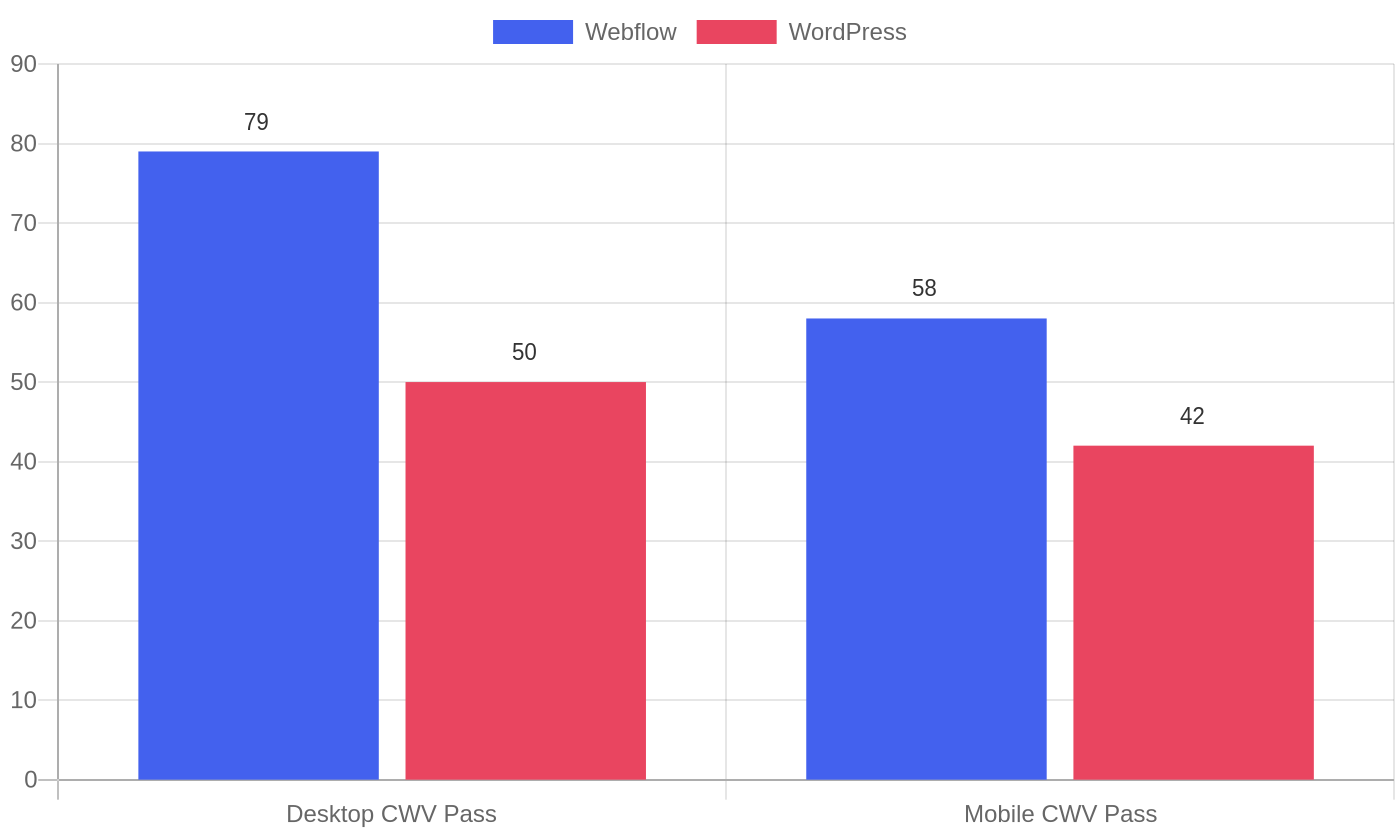
Webflow passes all three Core Web Vitals targets on 79% of desktop origins and 58% of mobile origins, versus 50% and 42% for WordPress. Its desktop median Lighthouse score is 73 versus WordPress’s 63, and the Fast TTFB pass rate (first byte under 200ms) is 85% to 88% versus WordPress’s 32%. Speed matters for revenue. Portent’s lead-gen data shows conversion rates around 40% at one-second loads dropping to about 29% at three seconds, a roughly 27% falloff.
Performance is the strongest single argument for Webflow. A 500-plus-site migration analysis found mobile PageSpeed scores jumping from a median of 64 on WordPress to 91 on Webflow within six months, alongside a 23% average organic traffic gain and a 42% increase in first-page keyword rankings. For content-heavy B2B sites, page speed directly affects how many visitors read the next post.
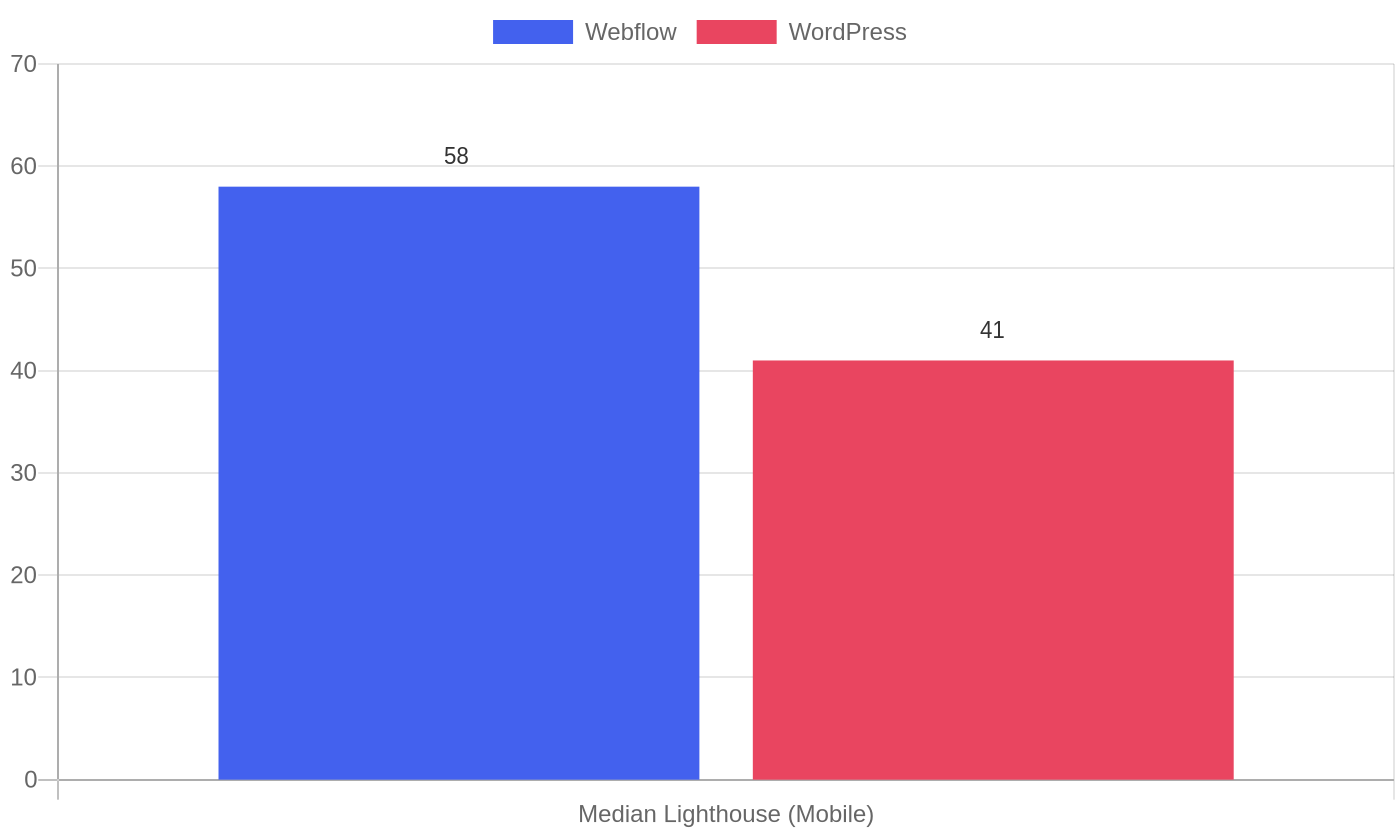
WordPress can absolutely reach excellent Core Web Vitals, but it takes deliberate configuration: a managed host, caching, image optimization, careful plugin discipline. That engineering effort is real money, which connects straight back to Filter 1. Out of the box, Webflow wins on speed by a clear margin.
Sources: HTTP Archive Web Almanac, Chrome UX Report, Portent lead-gen conversion study, migration analysis of 500+ B2B sites.
Security and the maintenance cage
WordPress powers roughly 43% of the web, which makes it the top target for attackers. The security data is stark, and it is a real operating cost that most comparison posts hand-wave.
Patchstack’s State of WordPress Security reported 11,334 new WordPress vulnerabilities in 2025, up 42% year over year, with 91% originating in third-party plugins and only two from core. Over 43% need no login credentials, so attackers scan automated scripts across the web. The median time from disclosure to mass exploitation is just five hours, and at the moment of disclosure 46% of vulnerabilities had no patch available. A monthly plugin-update routine is not fast enough to beat a five-hour exploit window.
That is the maintenance cage. A professional WordPress site takes an estimated four to eight hours of active work a month (staging setups, plugin updates, regression-testing forms and CRM endpoints, PHP and database upkeep). At $100 an hour, that is $4,800 to $9,600 a year before you touch the subscription costs.
Webflow removes the entire plugin attack surface because there is no third-party plugin layer. Security patches, SSL, and DDoS protection are handled at the platform level, and it holds SOC 2 Type II compliance. It also runs automatic backups every ten minutes or ten changes. For B2B teams with regulated enterprise data, that is a meaningful reduction in exposure and in someone’s to-do list.
Sources: Patchstack State of WordPress Security (2026), Sucuri Website Threat Report (2025), manageWP plugin vulnerability analysis.
The B2B decision matrix: which one for your team?
Here is a comparison table that weights the factors that matter for a B2B blog, with the first column showing the deciding question.
| Deciding question | Webflow | WordPress |
|---|---|---|
| Editorial workflow | Weak; no native draft-review or approval roles, CMS metadata friction | Strong; 5 native roles, draft-review workflow out of the box |
| Design autonomy | Excellent; pixel-level visual control, no dev ticket | Weak; usually a developer ticket or a heavy page builder |
| Core Web Vitals | Fast by default; static CDN, 79% desktop pass | Fast only with deliberate caching, CDN, and image setup |
| Maintenance burden | Minimal; platform handles updates, backups, security | 4-8 hrs/month; plugins, core, PHP, security upkeep |
| Scale ceiling | 20,000 CMS items / 40 collections on Premium; Enterprise past that | Effectively unlimited content capacity |
| Lock-in / exit | Exits are a full rebuild; only static assets export | Portable; database and code move to any host |
Worked example: Brightpath. Imagine a 14-person B2B SaaS with a content-first blog publishing eight posts a month. The blog is the primary lead source, so SEO and editorial workflow matter more than pixel-perfect design. Two senior content editors publish daily, and there is no dedicated front-end developer on the marketing team. For Brightpath, WordPress on managed hosting (with Rank Math for SEO and a fixed monthly maintenance retainer) beats Webflow: the native editing roles and draft-review workflow match how the team already operates, and maintenance is a known line item, not a surprise. Webflow would only win if Brightpath were redesign-led, focused on few high-design landing pages, and willing to invest in a design-capable team.
What most teams get wrong about Webflow vs WordPress
Five mistakes come up again and again.
- Comparing list price instead of three-year total cost. “WordPress is free” stops being true the moment you add managed hosting, plugins, and maintenance. Run the three-year number.
- Ignoring who holds the keys. If your writers cannot publish without a developer ticket, you are not comparing CMSs, you are planning your bottleneck.
- Treating speed as a plugin problem. You can fix WordPress performance, but every fix is ongoing engineering. Webflow’s static CDN gives it to you by default.
- Forgetting the scale ceiling. Webflow’s 20,000 CMS item cap is fine until it is not. If you run a directory or a high-volume programmatic SEO operation, model the ceiling now.
- Ignoring the exit. Leaving WordPress is portable. Leaving Webflow is a full rebuild. That asymmetry is a business risk, not a technical footnote.
How to evaluate your own platform (step by step)
Run this five-step workflow before you commit. A worked version with Brightpath is inline.
- Map your content volume. Count current posts, pages, and CMS items, then project three years out. Brightpath: 400 posts now, projected 900 in three years. Comfortably under both ceilings.
- Identify your bottleneck. Ask who has to touch the site for a new post to go live. If it is a developer, note it. Brightpath’s bottleneck was editorial approval, not design.
- Model three-year cost. Build the subscription and maintenance math from Filter 1, and write it down. Brightpath’s math favored WordPress on paper.
- Test the SEO plugin gaps. List the SEO features you use today (internal linking suggestions, schema automation, no-follow controls). Check whether the platform provides them natively. Brightpath needed Rank Math’s schema automation, which WordPress provided.
- Stress the exit. Ask what happens if you migrate in three years. For Brightpath, WordPress’s portability was decisive.
FAQs
Is Webflow better than WordPress for SEO?
Webflow handles essential on-page SEO natively (meta, canonicals, sitemaps, Open Graph, 301 redirects). WordPress needs a plugin like Rank Math or Yoast for the same level of control, but those plugins add features Webflow lacks: real-time internal-linking suggestions, automated schema markup, and one-click no-follow attributes. For a B2B content operation that leans on SEO, WordPress with an SEO plugin is usually the stronger daily tool.
Is WordPress cheaper than Webflow for B2B?
On pure subscription cost, yes. But a professional WordPress site needs managed hosting, a premium plugin stack, and ongoing maintenance, which pushes realistic cost toward several thousand dollars a year. Over three years, a self-maintained WordPress site can cost less than Webflow, while a site that relies on paid developer support can exceed it. The cost winner depends on whether you carry maintenance in-house.
Can I migrate from WordPress to Webflow without losing SEO?
Yes, with careful work. Success hinges on mapping every old URL to a one-to-one 301 redirect, exporting content to CSV, matching fields to Webflow collections, and structuring data for AI crawlers. A standard B2B migration takes four to eight weeks. Skipping redirect mapping is the number one cause of organic traffic drops.
Does Webflow have limits on blog posts?
Webflow’s Premium plan caps you at 20,000 CMS items and 40 collections. That is a lot for a typical blog, but a high-volume programmatic operation or a large directory can hit it, forcing an upgrade to Enterprise or an external database workaround. WordPress has no equivalent content ceiling.
Which is better for a small B2B marketing team without developers?
If the team needs design autonomy and speed without engineering, Webflow is a strong fit. If the team is content-first and publishes frequently, WordPress’s native editing roles and editorial workflow usually serve it better, provided a maintenance budget exists for hosting, plugins, and security.
What to do next
Stop comparing editors and start modeling cost, speed, and scale against your own operation. Run the three filters from this guide with your real numbers, then pick the platform that survives a three-year check, not a three-hour demo.
If you stay on WordPress, make performance and security deliberate. Choose managed B2B hosting rather than shared, adopt an SEO plugin for schema and linting, and budget a few hours a month for updates. If your blog is small and design-led, Webflow’s speed and zero-maintenance model are compelling, just plan for its CMS cap and its lock-in from day one.
