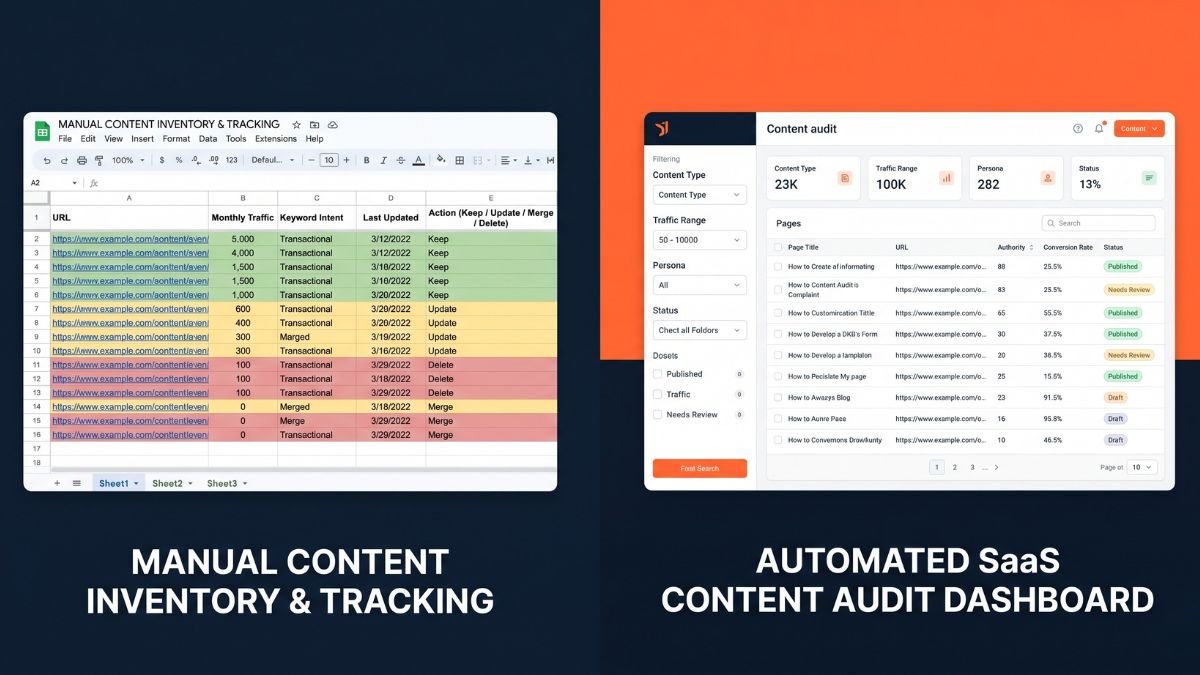

Quick Answer: Should B2B teams use a content audit tool or spreadsheet?
B2B teams managing under 50 pages can audit effectively with a Google Sheets spreadsheet pulling data from Google Search Console. Once you pass 50 pages or need to track multiple metrics simultaneously (traffic, backlinks, conversions), a dedicated content audit tool like Semrush or Ahrefs saves 5–10 hours per audit cycle. The spreadsheet approach is free but manual; tools automate data collection and surface issues automatically.
Disclosure: Some links in this post are affiliate links. If you sign up through them, I may earn a commission at no extra cost to you. I only recommend tools I believe are genuinely useful.
For teams with fewer than 150 published pages running audits once or twice a year, the content audit tool vs spreadsheet debate often has a simple answer: a well-built spreadsheet is not a compromise. It is the right tool. For teams managing 200 or more URLs, running audits quarterly, or dealing with content decay they cannot manually catch, a dedicated content audit tool pays for itself within the first audit cycle.
The debate between the two is less about budget and more about volume, frequency, and how much friction your team can absorb before the process breaks down. Most B2B teams use a spreadsheet because they started with one. Most teams that switch to a tool do so six months after they should have. This guide gives you a scoring framework so you can figure out which camp you are in before you waste another audit cycle.
What Is a Content Audit?
A content audit is a systematic review of every page on your site, or a defined subset, to evaluate performance and decide what to do with each piece of content. Keep it. Update it. Merge it with another page. Redirect it. Delete it. The audit pulls together data from Google Search Console, Google Analytics 4, and your CMS to give you a complete picture of what is working, what is declining, and what is dead weight.
The thing most teams underestimate is frequency. A content audit run once a year is useful. One run quarterly is transformative. The teams that compound their content investment year over year run audits on a rolling basis, reviewing their highest-traffic pages every 90 days and their full archive annually.
That frequency is exactly why the spreadsheet vs tool question matters more than most people realise. A process you run once a year can tolerate being manual. One you run four times a year cannot.
The Case for Spreadsheets: Still the Right Answer for Small Sites
If you manage a B2B blog with fewer than 100 published posts, a spreadsheet is not a workaround. It is the appropriate tool for the job. The fact that it is free and flexible is secondary. The real reason it works is that at that content volume, the manual effort is manageable and the customisation is genuinely valuable.
A well-structured spreadsheet lets you define your own scoring logic, set your own prioritisation rules, and categorise pages in whatever way makes sense for your business. No external framework gets imposed on you. You build the system that fits your content strategy, not the one that ships pre-packaged with someone else’s subscription.
What a good content audit spreadsheet actually looks like
The typical setup is one row per URL, with columns for page title, primary keyword, word count, last updated date, organic sessions, Google Search Console impressions, clicks, average position, number of internal links, content type, and a priority score. That priority score is usually a weighted formula: traffic multiplied by 0.4, ranking position score multiplied by 0.3, business relevance multiplied by 0.3. The final column is your decision: Keep, Update, Merge, Redirect, or Delete.
The data comes from three places. Your CMS for the URL inventory, Google Search Console for impressions and ranking data, and Google Analytics 4 for organic sessions. If you want crawl data, title tags, meta descriptions, word count, internal link counts, you run a Screaming Frog crawl on top of those and merge the exports manually.
This works. Many B2B content teams at 30 to 80 person companies run lean, effective content programmes entirely out of Google Sheets, and they produce real results from it.
Where spreadsheets start to break down
The problem is not the spreadsheet. The problem is everything a spreadsheet cannot do automatically, and that list gets expensive as your content library scales.
Spreadsheets have no automated alerts when a page’s traffic starts declining. You only catch content decay when you remember to look. They require manual exports from multiple tools every time you want fresh data, which means your audit is stale by default. Collaboration is fragile: version conflicts, overwrites, and tab sprawl are a constant risk when more than one person is working in the same file. There is no built-in historical comparison either. Unless you manually save point-in-time snapshots every quarter, you have no baseline to measure improvement against.
None of those are fatal flaws at 80 URLs. At 300 URLs, they are the reason content teams stop running audits entirely.
The Case for Content Audit Tools: What Automation Actually Buys You
Content audit software solves the friction problems that make spreadsheets unsustainable at scale. The value is not the dashboards or the visual reporting, though those are useful. The real value is that the data is always current, the crawl runs on a schedule, and the system flags problems before you go looking for them.
The most important capability a tool provides that a spreadsheet cannot is content decay detection. When a page that was generating 400 organic sessions a month drops to 180 over three months, a tool with Google Search Console integration flags that automatically. With a spreadsheet, you only catch it if you happen to compare two exports side by side. Most teams do not. Most teams discover content decay when their overall traffic drops and they scramble for the cause.
The tools B2B teams actually use
| Tool | Best For | Price Range | Key Strength |
| Ahrefs Site Audit | SEO-focused teams | $99 to $449/mo | Deepest crawl data combined with ranking history |
| Semrush Content Audit | Full content operations | $119 to $449/mo | Native GSC integration with decay alerts built in |
| Screaming Frog | Technical crawl baseline | Free / £149/yr | Comprehensive crawl without a full-platform subscription |
| MarketMuse | Topic authority and gap analysis | $149 to $999/mo | Content scoring against your competitive landscape |
| Surfer SEO | On-page optimisation | $89 to $219/mo | Content scoring aligned directly to ranking targets |
A tool gives you data. It does not give you strategy. The teams that buy software and immediately feel overwhelmed by it are the ones who did not have a decision framework before they started. The tool surfaces the information. You still have to decide what Keep, Update, Merge, Redirect, and Delete means for your business, and that thinking has to happen before the first crawl runs.
Head-to-Head Comparison: Content Audit Tool vs Spreadsheet
| Factor | Spreadsheet | Content Audit Tool |
| Cost | Free | $89 to $449 per month depending on the platform |
| Setup time | 2 to 4 hours of manual work | 30 to 60 minutes once integrations are live |
| Data freshness | Stale by default, manual updates only | Automated and synced on a defined schedule |
| Content volume | Best under 150 URLs | Handles 500 to 50,000 plus URLs |
| Content decay detection | Manual monitoring — you catch it when you look | Automated alerts built in |
| Crawl data | Requires Screaming Frog separately | Native on most platforms |
| GSC and GA4 integration | Manual export and import each cycle | Native API connections |
| Internal link analysis | Manual or separate tool required | Built in on Ahrefs and Semrush |
| Collaboration | Version conflict risk with multiple editors | Shared workspace with no file conflicts |
| Historical tracking | Manual snapshots or none at all | Automated versioning and trend tracking |
| Customisation | Fully flexible — you define every rule | Constrained to the tool’s framework |
| Best for | Solo marketers and teams under 150 URLs | Teams with 200 plus URLs or quarterly audits |
The takeaway from this comparison is that neither option wins on every dimension. The spreadsheet wins on cost, flexibility, and setup simplicity. The tool wins on everything that requires automation and scale. The right choice depends on which weaknesses you can afford to live with given your team’s current situation.
The CATS Decision Framework: How to Choose in Under Five Minutes
Most comparison guides tell you what each option does. This gives you a scoring model so you do not have to make the decision by gut feel.
CATS evaluates your situation across four factors: Content volume, Audit frequency, Team size, and Scale plans. Score each factor from 0 to 2, add the scores up, and the total tells you which approach fits your situation right now.

| CATS Factor | Score 0 — Spreadsheet | Score 1 — Either works | Score 2 — Tool |
| C — Content Volume | Under 100 URLs | 100 to 300 URLs | 300 or more URLs |
| A — Audit Frequency | Once per year | Twice per year | Quarterly or more |
| T — Team Size | Solo or one person | Two to three people sharing the audit | Four or more, or cross-functional teams |
| S — Scale Plans | Content volume staying flat | Moderate growth expected | Significant growth or additional sites planned |
| Total CATS Score | Recommendation |
| 0 to 2 | Use a well-structured spreadsheet. Invest in a solid template and make sure there is a named owner for the process. |
| 3 to 4 | Hybrid approach. Spreadsheet for decision-making, Screaming Frog for crawl data, manual GSC export for performance metrics. |
| 5 to 8 | Content audit tool. Your time savings and data quality improvements will justify the cost within one audit cycle. |
One pattern shows up consistently across content teams: they score themselves a 2 or 3, stay with a spreadsheet, then switch to a tool six to nine months later after burning hours on manual data pulls they should have automated. If the friction is already obvious to you, that is the signal. You are probably at a 4 heading toward a 5, and the tool conversation should start now.
What Most Teams Get Wrong About Content Audits
Treating the spreadsheet as the problem
The spreadsheet is not the issue. A disorganised, inconsistently updated spreadsheet with no scoring logic and no named owner is the issue. Before investing in a tool, make sure your process is solid. Many teams switch to a content audit tool and recreate the same chaos in a more expensive interface. The discipline has to come first; the tool amplifies whatever system you already have.
Buying the tool before defining the decision rules
A content audit tool gives you data. It does not give you clarity on what to do with that data. The most common failure mode for teams that rush to a tool is that they run the crawl, look at a dashboard full of signals, and have no idea how to prioritise. Define your Keep, Update, Merge, Redirect, and Delete criteria before you open the tool for the first time. What makes a page worth updating? What makes it worth deleting? If you cannot answer those questions using a spreadsheet, a tool will not help you answer them.
Auditing everything at once
Whether you are using a tool or a spreadsheet, auditing your full content archive in one pass produces a backlog no team has the capacity to act on. The better approach is to triage first. Start with pages that have existing organic traffic but declining performance. Those are your highest-leverage opportunities. A focused 20-page update sprint consistently outperforms a 300-page audit that produces a spreadsheet nobody opens.
Running the audit without Google Search Console data
The biggest gap in most content audits is missing organic search data. Crawl data without Google Search Console impressions and clicks is just a URL inventory. It tells you what exists, not what is performing or why. If you do nothing else this week, connect GSC to whatever tool or process you are using. For a spreadsheet audit, that means exporting the last six months of page-level data from GSC and mapping it to your URL list. For a tool, verify the GSC integration is active before you run the first crawl.
How to Transition From Spreadsheet to Tool Without Losing What You Built
Most B2B teams do not need to choose one approach permanently. The practical path is to start with a spreadsheet, build a solid process, and upgrade when the friction becomes measurable. Here is what that looks like across three phases.

Phase one: Spreadsheet (months one through six, under 150 URLs)
Download a structured content audit template with the core columns: URL, title, primary keyword, word count, last updated date, organic sessions, GSC impressions, clicks, average position, internal link count, content type, and a priority score. Run your first audit on your top 50 pages by organic sessions rather than the full archive. Build the quarterly review habit before you try to scale the process.
Phase two: Hybrid (six to twelve months, 100 to 300 URLs)
Continue using the spreadsheet for categorisation and decision tracking, but add Screaming Frog for automated crawl data and use Ahrefs or Semrush for competitive gap analysis on your priority pages. This gives you the best of both approaches: flexibility and automation where it matters most, without the full tool subscription overhead while you are still building your content audit muscle.
Phase three: Full tool (twelve or more months, 300 plus URLs)
At this stage, you have a proven process and enough content volume to justify dedicated software. Evaluate Semrush Content Audit or Ahrefs Site Audit based on your primary use case. If you are SEO-focused, Ahrefs gives you deeper crawl and ranking data. If you want integrated decay alerts and campaign tracking, Semrush is the more turnkey option. Set up automated quarterly crawls, activate decay alerts for your top pages, and migrate your spreadsheet decision logic into the tool’s tagging or segmentation system.
The transition should not feel like starting from scratch. Your scoring model, decision criteria, and URL categories transfer directly. The tool removes the manual overhead around data collection, not the strategic thinking you have already built.
FAQ
Is a spreadsheet good enough for a content audit?
Yes, for teams with fewer than 150 URLs running audits once or twice a year. The key is having clear structure: defined columns, a scoring formula, and a named owner. A well-run spreadsheet audit consistently outperforms a disorganised tool-based audit. The tool is not the variable that determines quality. The process is.
What content audit tool is best for small B2B marketing teams?
Semrush Content Audit integrates directly with GSC and GA4, making it the most turnkey option for lean teams who want automated data without heavy configuration. Ahrefs Site Audit provides deeper crawl data and suits teams with a strong SEO focus. If budget is the main constraint, Screaming Frog at £149 per year paired with a manual GSC export covers the most critical needs for teams under 500 URLs.
How long does a content audit take in a spreadsheet vs a tool?
A spreadsheet audit of 100 URLs typically takes six to ten hours across data collection, scoring, and categorisation. Most of that time goes into data collection. The same audit in a tool with live GSC integration takes two to four hours. At 500 URLs, the difference becomes significant: twenty or more hours in a spreadsheet versus four to six in a tool.
When should I upgrade from a spreadsheet to a content audit tool?
Upgrade when you hit at least two of these triggers: more than 200 URLs to manage, recurring audits more than twice per year, more than one person who needs simultaneous access to audit data, or more than three hours of manual data collection per audit cycle. Run through the CATS framework above to get a clearer answer based on your specific situation.
Can I use a spreadsheet to track content decay?
Yes, but only if you manually save monthly or quarterly snapshots and compare them over time. Without that discipline, a spreadsheet gives you a point-in-time view with no baseline to measure against. Content audit tools automate this by pulling historical data from GA4 and GSC and flagging pages that show consistent decline, which is the primary reason most teams upgrade once they start taking content decay seriously.
What is the first page I should audit?
Open Google Search Console, filter by the last six months, and sort your pages by impressions descending. Find the five pages with impressions above 1,000 but a click-through rate below 3 percent. Those are your first update candidates. High impressions and low CTR usually means your title or meta description is not matching what searchers actually want, and a focused rewrite can generate meaningful traffic gains within 30 to 60 days.
What to Do Next
Do not spend more time deciding. The right answer for your team is probably already clear from the CATS score. Here is the action that fits your situation.
| Your Situation | What to Do This Week |
| Under 100 URLs, first audit ever | Download the B2BContentOS Content Audit Spreadsheet and run your first triage audit on your top 25 pages by organic sessions. Do not try to audit everything at once. |
| 100 to 300 URLs, auditing twice per year | Run the CATS framework. If your score is 4 or higher, start a Semrush or Ahrefs trial before your next audit cycle. At 3 or below, tighten your spreadsheet process first. |
| 300 plus URLs or quarterly audits | Start a trial of Semrush Content Audit or Ahrefs Site Audit, connect GSC on day one, and run your first automated crawl before you build anything else manually. |
| No audit process at all | Start with the spreadsheet, not the tool. Build the habit and the decision framework first. A tool without a process produces expensive confusion, not results. |
The single most impactful thing you can do today requires no subscription: open Google Search Console, filter by the last six months, sort by impressions descending, and find the five pages with impressions above 1,000 but a click-through rate below 3 percent. Those are your first update candidates. Start there.
For a structured framework on running your first audit, read How to Do a B2B Content Audit. If you are evaluating software, the Best Content Audit Tools for B2B Teams guide breaks down exactly what to look for at each budget level. And if you are ready to start your first manual audit today, download the B2BContentOS Content Audit Spreadsheet Template and follow the scoring model inside.
