

Publer is a good social media scheduler. Whether it is the right one for your B2B team depends on three things: how many platforms you post to, how many people are on your team, and how much you care about analytics beyond basic engagement metrics.
If you run content across LinkedIn, Twitter/X, Facebook, and a couple of other channels with a team of one to five people, Publer is one of the best-value tools available. If you need deep analytics, social listening, or CRM integration, it will leave you wanting more.
Here is an honest look at what Publer does well, where it falls short, and how to know if it is worth paying for.
What Publer Does (and What It Doesn’t)
Publer is a social media scheduling and publishing platform that supports 12 or more networks: LinkedIn, Twitter/X, Facebook, Instagram, TikTok, YouTube, Pinterest, Google Business, Threads, Mastodon, Bluesky, and Telegram. You can schedule posts, bulk upload via CSV, recycle top-performing content automatically, and manage multiple workspaces from one account.
What it does not do: unified inbox, social listening, deep CRM integration, or granular attribution reporting. Those are deliberate omissions, not oversights. Publer is priced and built for content creation and scheduling, not community management or revenue attribution.
That distinction matters more for B2B teams than it does for B2C or agencies. If you are a SaaS content marketer trying to tie LinkedIn posts to pipeline, Publer’s analytics will not give you that. If you are trying to keep a consistent posting cadence across six platforms without paying $99 per month, it almost certainly will.
The B2B Social Fit Score
Before you start a free trial, run your team through this five-factor scoring model. It takes three minutes and tells you whether Publer is built for your situation.
Score each factor from 1 to 3. A total of 12 or higher means Publer is a strong fit. A total of 8 to 11 means fit depends on which factors scored low. A total below 8 means you should look at alternatives before committing.
B2B Social Fit Score Calculator
Score each factor to see if Publer fits your team. Total 12+ = strong fit.
Factor 1: Team size. Score 3 if you have 1 to 3 users. Score 2 if you have 4 to 8. Score 1 if you have 9 or more. Publer's pricing scales per user, so larger teams see costs climb quickly.
Factor 2: Content volume. Score 3 if you publish more than 10 posts per week across all channels. Score 2 for 4 to 10 posts. Score 1 for fewer than 4. Publer's value proposition centers on scheduling efficiency. Low-volume teams often do not need a dedicated scheduler.
Factor 3: Analytics depth. Score 3 if basic engagement metrics are enough. Score 2 if you need monthly performance reports. Score 1 if you need pipeline attribution or cross-channel revenue reporting. Publer's analytics are adequate, not advanced.
Factor 4: Platform diversity. Score 3 if you post to four or more platforms. Score 2 for two to three. Score 1 if you are LinkedIn-only or single-channel. Multi-platform teams get the most leverage from Publer.
Factor 5: Approval workflow complexity. Score 3 if a simple one-step approval is enough. Score 2 if you need two-step approval. Score 1 if you need multi-stage review with external stakeholders. Publer handles the first two well. Complex enterprise-style approvals can get clunky.
Publer's Core Features, Rated for B2B Use
Here is how the key features actually perform in a B2B content context, not a social media agency or creator context.
Scheduling and content calendar: 9/10. Publer's calendar is clean. You get a drag-and-drop monthly or weekly view, color-coded by account, with a clear queue for each connected profile. AutoSchedule picks the best posting times based on historical engagement (Business plan). Bulk upload via CSV lets you load a month of posts in minutes. Content recycling automatically re-queues evergreen posts so you are not starting from zero every quarter.
AI caption generation: 7/10. The AI Assist tool generates captions from a prompt or an uploaded image. For broad B2B topics, it produces usable first drafts. For niche verticals like industrial manufacturing or specialized SaaS, the output turns generic fast and needs significant editing. Treat it as a starting point, not a final draft. This is consistent with what you see in any AI writing tool right now: the more specific your industry, the more editing you do.
Analytics: 6/10. On the Business plan, you get post performance, follower growth, and engagement rate data per account. What you will not get: attribution models, UTM tracking at the post level, or cross-channel revenue correlation. For B2B teams where every piece of content needs to justify pipeline contribution, Publer's analytics show you what happened, not why or what it produced. That is a genuine limitation for mature B2B content programs.
Team collaboration: 8/10. Multiple workspaces keep brand or client accounts separate. You can assign custom roles, require post approvals before publishing, and leave notes on drafts. The Business plan unlocks full approval workflows. For a team of two to five people working on shared social output, the collaboration tools are more than adequate.
Integrations: 8/10. Publer connects with Canva directly from the post composer, imports from RSS feeds for content curation, and supports VistaCreate for design. There is no native Slack notification or HubSpot sync built in, though the Business plan supports webhooks for custom connections.
Content recycling: 9/10. This is one of Publer's strongest features for B2B teams. Set a post as recyclable, choose a frequency, and Publer automatically re-adds it to the queue. For evergreen content like stat posts, pillar page summaries, or case study snippets, this saves two to three hours a month without any ongoing effort.
What You Actually Pay
Publer uses a modular pricing model. You pay a base rate per social account plus a small fee per additional team member. This makes it genuinely affordable for individuals and small teams, and noticeably more expensive as you scale.
| Scenario | Professional | Business |
|---|---|---|
| 1 user, 3 accounts | ~$12/mo | ~$21/mo |
| 2 users, 5 accounts | ~$26/mo | ~$44/mo |
| 3 users, 8 accounts | ~$40/mo | ~$66/mo |
| 5 users, 12 accounts | ~$62/mo | ~$98/mo |
Annual billing drops these by approximately 20 percent. The Professional plan covers unlimited scheduling, all platforms including Twitter/X, bulk upload, and RSS automation. The Business plan adds AI Assist, analytics, AutoSchedule for best-time posting, approval workflows, and content recycling.
For most B2B content marketers, the Business plan is the right tier. The approval workflow and analytics alone justify the jump from Professional for any team with more than one person creating content.
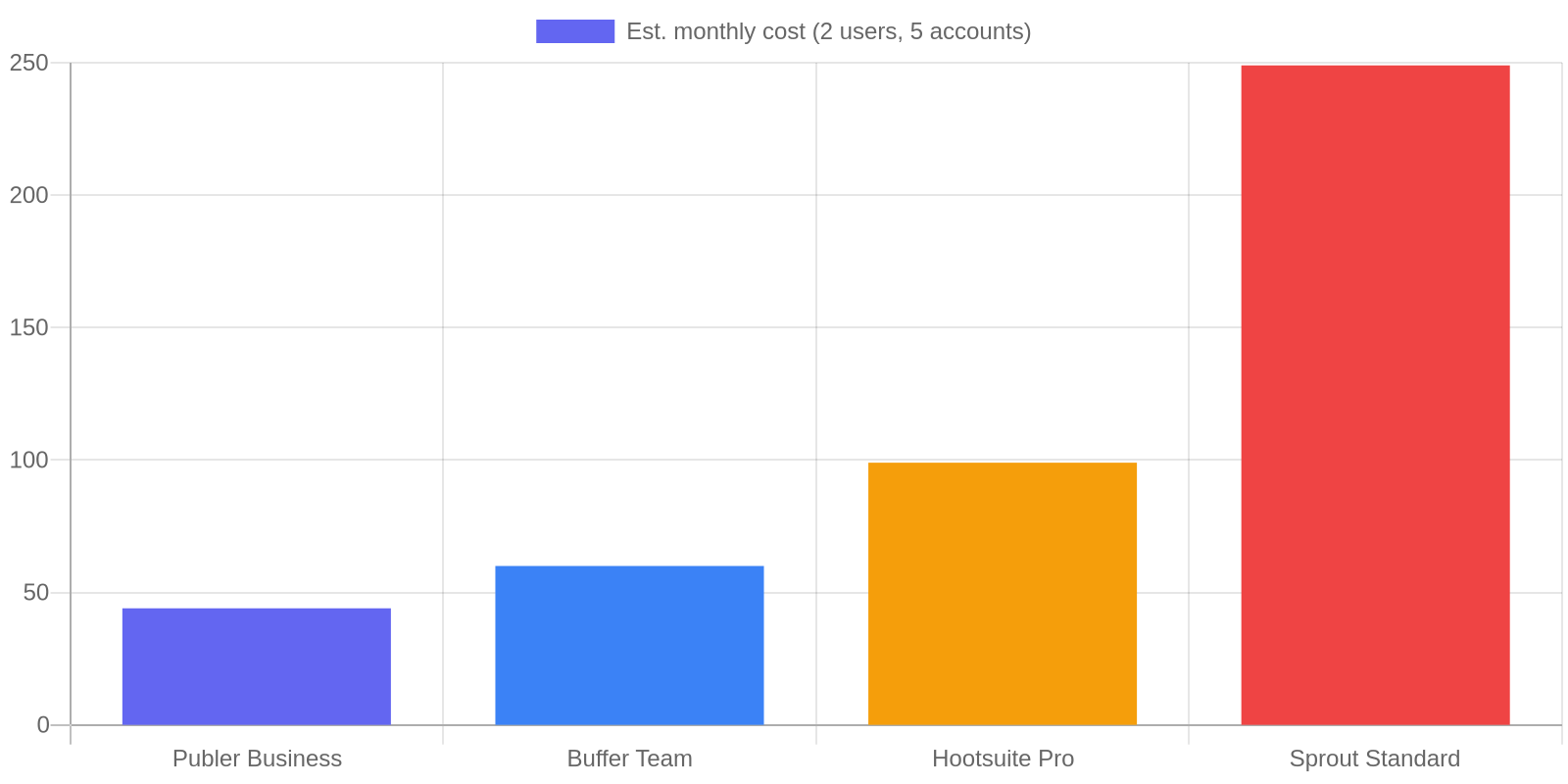
Publer sits at roughly half the price of Buffer for comparable feature sets, and a quarter of Hootsuite at the same scale. That gap is meaningful when you are a lean team managing your own tools budget.
Where Publer Falls Short for B2B Teams
No unified inbox. You cannot manage replies, comments, or DMs from inside Publer. Every conversation requires jumping back to the native platform. For B2B teams where LinkedIn comments are often actual sales conversations, this is a real gap. You will need a separate tool or just accept that inbox management stays manual.
Analytics do not connect to pipeline. Publer shows you engagement. It does not show you which LinkedIn post drove traffic to your pricing page, which content format produces the most profile visits, or which campaign contributed to form fills. That correlation has to happen manually, outside the tool.
AI quality is inconsistent for niche B2B topics. If your content covers a specific vertical like DevOps, compliance software, or industrial automation, expect to rewrite most AI-generated captions from scratch. The output defaults to generic business language that sounds like no one in your industry actually speaks.
Pricing surprises teams at scale. The starting price looks low. Once you are at six accounts and four users, you are paying more than most people budgeted. Run the actual numbers at your real account and user count before committing to a plan.
Publer vs. The Alternatives
| Publer | Buffer | Hootsuite | ContentStudio | |
|---|---|---|---|---|
| Best for | Multi-platform B2B teams | Simple scheduling | Enterprise analytics | Agencies, content curation |
| Analytics | Basic | Basic | Advanced | Moderate |
| Unified inbox | No | No (paid add-on) | Yes | Yes |
| Social listening | No | No | Yes (paid) | Yes |
| Est. cost (5 accts, 2 users) | ~$44/mo | ~$60/mo | ~$99/mo | ~$49/mo |
| Content recycling | Yes | No | No | Yes |
| Approval workflows | Business plan | Yes | Yes | Yes |
The honest summary: Publer wins on price and content recycling. ContentStudio is competitive on price and includes a unified inbox. Hootsuite and Sprout are in different price brackets, justified only if you need enterprise analytics or social listening.
If you are a B2B content team of two to four people publishing across five or more platforms with a real content calendar, Publer is probably your best option on pure value. If community management is a priority, ContentStudio is worth the extra cost at similar scale.
What Most Teams Get Wrong When Buying a Social Scheduler
The most common mistake is buying a scheduler to solve a strategy problem. If your LinkedIn content is not generating engagement, a scheduling tool will not fix that. It will automate posts that underperform on a more consistent schedule.
The second mistake is ignoring account and user count when evaluating price. Every social scheduler looks affordable at the base tier. The real cost is what you pay at your actual team size and account count. Model the price at your real usage before comparing tools.
The third mistake is evaluating analytics features you will never actually build a review process around. Most teams have more reporting capability than they use. Before paying for advanced analytics, ask whether your team has a standing meeting to review social performance data. If the answer is no, those features will not get used.
Publer is a good tool that gets used poorly by the wrong team for the wrong reasons at the wrong tier. Match the tier to the workflow, not to the features list.
Frequently Asked Questions
Is Publer good for B2B LinkedIn scheduling?
Yes. LinkedIn is one of Publer's best-supported platforms. You can schedule posts, carousels as PDF files, and articles. You can set optimal posting times on the Business plan and recycle evergreen content automatically. The main limitation is that Publer cannot manage LinkedIn DMs or comments from inside the platform.
Does Publer have a free plan?
Yes. The free plan supports three social accounts and up to ten scheduled posts per account. Twitter/X is not included on the free plan. It is useful for testing the interface before committing, but not sufficient for an active B2B content operation.
How does Publer pricing compare to Buffer?
At comparable account and user counts, Publer typically costs 30 to 50 percent less than Buffer. Buffer's advantages are a simpler interface and a longer track record. Publer's advantages are content recycling, a broader platform list, and lower per-account pricing as you scale.
Does Publer support approval workflows?
Yes, on the Business plan. You can require posts to go through an approval step before publishing, which is useful for teams where a manager or client needs to sign off before content goes live. The Professional plan does not include this feature.
Can Publer replace a social media manager?
No. Publer automates the publishing side of social media. It does not create strategy, write content reliably for niche B2B topics, or manage community engagement. It is a scheduling and distribution tool, and it is a good one within that scope.
Is there a Publer affiliate program?
Yes. Publer runs an affiliate program. This review contains an affiliate link to Publer, which means we may earn a commission if you sign up through it. That arrangement does not affect the assessment above.
What To Do Next
If your B2B team posts across three or more platforms, has two to five people touching social content, and does not need CRM-level attribution, start a Publer free trial. It is one of the few tools in this space where the value-to-price ratio is genuinely compelling at the scale most lean B2B content teams operate at.
Run your B2B Social Fit Score first (the calculator above). If you score 12 or higher, go straight to the Business plan trial. The approval workflow and content recycling features are where the real time savings live, and both are locked to the Business tier.
If you score below 10, spend 30 minutes comparing ContentStudio and Buffer at your actual account and user count before committing. The right tool is the one that fits your real workflow, not the one with the most features.
And if the real problem is that you do not have a consistent social content workflow to schedule in the first place, solve that first. A good starting point: see how other B2B teams are automating their content distribution workflows, then come back to the scheduler decision once the content engine is running. If your team uses AI to assist with content creation, the human-in-the-loop AI content workflow covers how to keep quality high without slowing down your publishing cadence.
Try Publer here with a 14-day free trial on paid plans.
