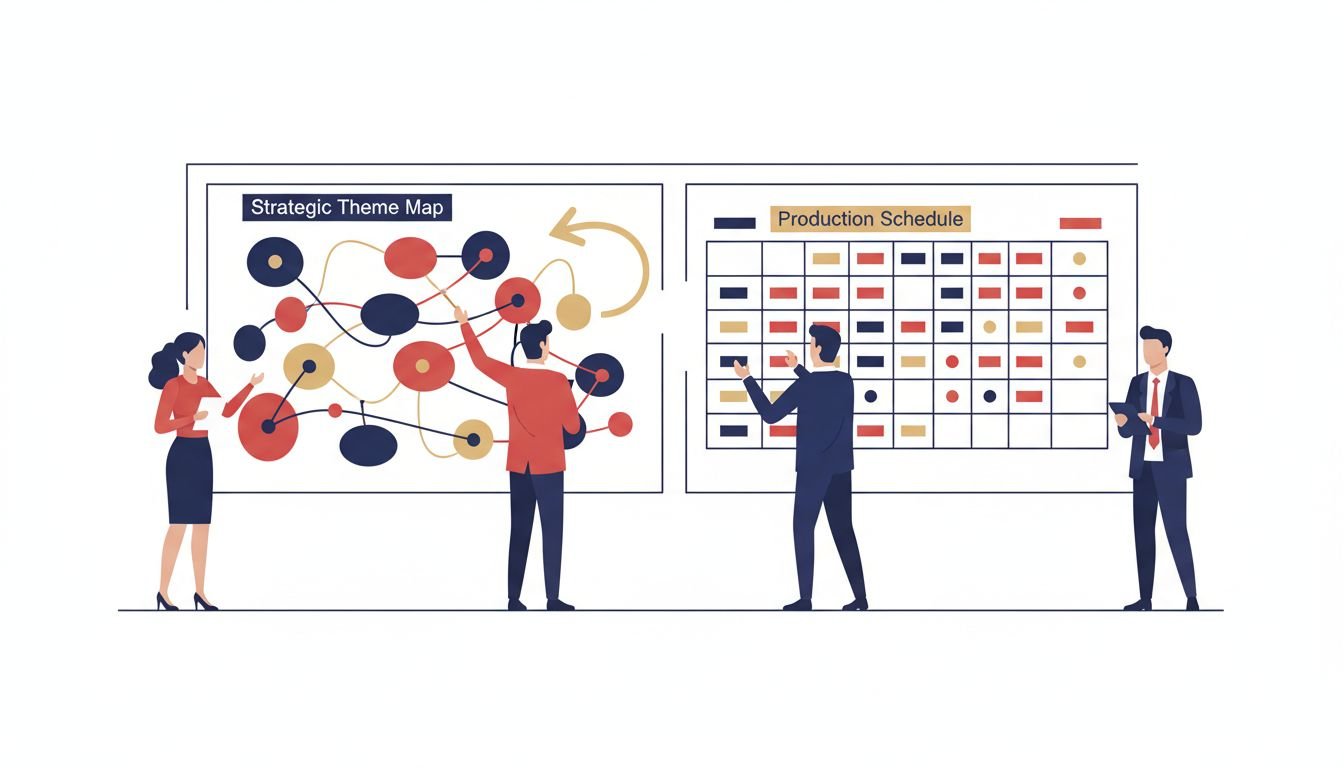

An editorial calendar and a content calendar are not the same thing, and most B2B teams need both. The editorial calendar answers what you will say and why: your themes, message pillars, topic clusters, and the buyer questions you will own. The content calendar answers who makes it, when it ships, and where it goes: owners, review checkpoints, production dates, and distribution channels. The stakes are measurable.
Marketing Insider Group’s survey data shows that 65% of the most successful B2B marketers have a documented content marketing strategy, compared to only 14% of the least successful Marketing Insider Group survey via Stackby. Teams that keep a written editorial plan separate from a dated production schedule document that strategic layer instead of burying it inside a task list. This guide gives you a decision framework for when each calendar matters more, grounds it in the data, and shows you how to build both without over-engineering them.
Editorial calendars and content calendars solve different problems
An editorial calendar is a strategic document. It lists the themes and topics you will publish, maps them to buyer stages and message pillars, and ties each piece to a business goal such as pipeline or share of voice. A content calendar is an operational one.
It lists the concrete tasks, owners, due dates, review steps, and channels required to actually produce and ship each piece. One answers the question what are we trying to say. The other answers how does it get done on time.
Think of the difference the way you would think of a product roadmap versus a sprint board. The roadmap tells the product team what problems matter and in what order. The sprint board turns that into assignable, dated work. Editorial calendars and content calendars sit in exactly that relationship for your content team. The editorial layer runs on a strategic horizon of six to twelve months, owned by marketing leadership, and maps campaign themes and content pillars ZoomInfo.
The content layer runs on a tactical horizon of one to three months, owned by content creators and project managers, and tracks specific assets, owners, and live statuses ZoomInfo. Confusing the two leads to one of two failures: a beautiful theme list that never ships, or a busy production schedule that ships plenty of content with no coherent message behind it.
Most teams build only the operational layer. They load July into a spreadsheet, assign writers, and check off deliverables. What they skip is the editorial layer that would tell them whether July’s topics actually ladder up to the quarterly revenue goal.
The result is volume without direction. The fix is not to pick one calendar over the other. It is to run the editorial layer as the source of truth and the content calendar as the execution arm that carries it into production.
The Two-Layer Calendar: an editorial layer plus an operations layer
The framework this guide is built around is the Two-Layer Calendar. It treats a content program as two connected documents rather than one hybrid spreadsheet. Layer One is the editorial plan. Layer Two is the production schedule. Each has a distinct owner, a distinct cadence, and a distinct tool. They connect at a single point: every row in the operations layer must trace back to a theme in the editorial layer, and every theme in the editorial layer must have at least one operations row assigned to it.
This separation is exactly what most failed content calendars are missing. When teams manage strategic positioning narratives and daily production logistics inside one flat spreadsheet, the result is a calendar that is either too detailed to maintain or too vague to act on NYT Licensing.
The editorial layer (Layer One) holds four things. First, your message pillars: the three to five recurring themes your brand can credibly own. Second, your topic clusters: the pillar pages and cluster posts that cover a subject comprehensively. Third, buyer-stage coverage: which pieces target awareness, which target evaluation, and which target decision. Fourth, the goals attached to each theme.
Keep this layer lean. Kalungi’s research recommends limiting active quarterly focus to one to three priority topic clusters and presenting stakeholders with a focused calendar of 12 to 16 quarterly pieces, not a raw list of a hundred keyword ideas Kalungi.
The operations layer (Layer Two) holds the mechanics. Each row names the piece, the owner, the writer, the SME who reviews it, the due date, the review checkpoints, the channels it will publish to, and the reuse tasks such as a newsletter variant or a LinkedIn post. Larger teams track a richer field set.
Ahrefs’ own content team uses a 19-field structure per entry, while a solopreneur operation runs fine on eight essential fields such as title, date, funnel stage, and target persona Ahrefs. Match the field count to your team’s size, not to a template’s ambition.
The reason this distinction matters more than it used to is that AI changed the production bottleneck. When writing was the slow step, a single calendar that listed topics and deadlines was enough. Now that drafts are fast, the bottleneck has moved to strategy, review, and distribution.
Teams that only have an operations calendar flood their channel with AI-assisted pieces that do not cohere. Teams that only have an editorial calendar have a strategy presentation and nothing on the calendar to ship. The Two-Layer Calendar keeps the strategic and the operational deliberately separate so neither collapses into the other.
Decision matrix: which calendar should your team lead with?
Use this matrix to decide whether your team should build the editorial layer first, the operations layer first, or invest in both at once. The right answer depends on your stage, your problem, and the size of your team.
| Situation | Start with | Why |
|---|---|---|
| You publish regularly but none of it connects to revenue | Editorial layer | Volume without themes produces activity, not pipeline. You need the message plan before more production. |
| Your strategy is clear but nothing ships on time | Operations layer | Reliable execution is the gap. A dated, owned production schedule with review SLAs fixes the bottleneck. |
| You are a one-person or two-person B2B content team | Both, but light | You need a theme list and a simple schedule. Keep both in one or two tabs with eight fields you actually update. |
| You report to the C-suite and must justify content spend | Editorial layer | Leadership wants to see themes tied to pipeline and share of voice before they fund more production. |
| Your team scales past three writers and multiple SMEs | Both, formally | More people means more coordination. A separate editorial and operations document prevents messages and logistics from colliding. |
If you can only build one thing this quarter, the decision hinges on which failure you suffer from today. If the phrase “we publish a lot but none of it goes anywhere” sounds familiar, build the editorial layer.
If “we keep missing dates and nobody knows who owns what” sounds familiar, build the operations layer. Most established B2B teams eventually need both, and the Two-Layer Calendar gives you a clean split instead of a bloated hybrid.
Chart: why documenting the strategic layer matters
The data behind the Two-Layer Calendar is clear. The chart below contrasts the share of most-successful and least-successful B2B marketers who keep a documented content strategy, from Marketing Insider Group’s survey data Marketing Insider Group survey via Stackby.
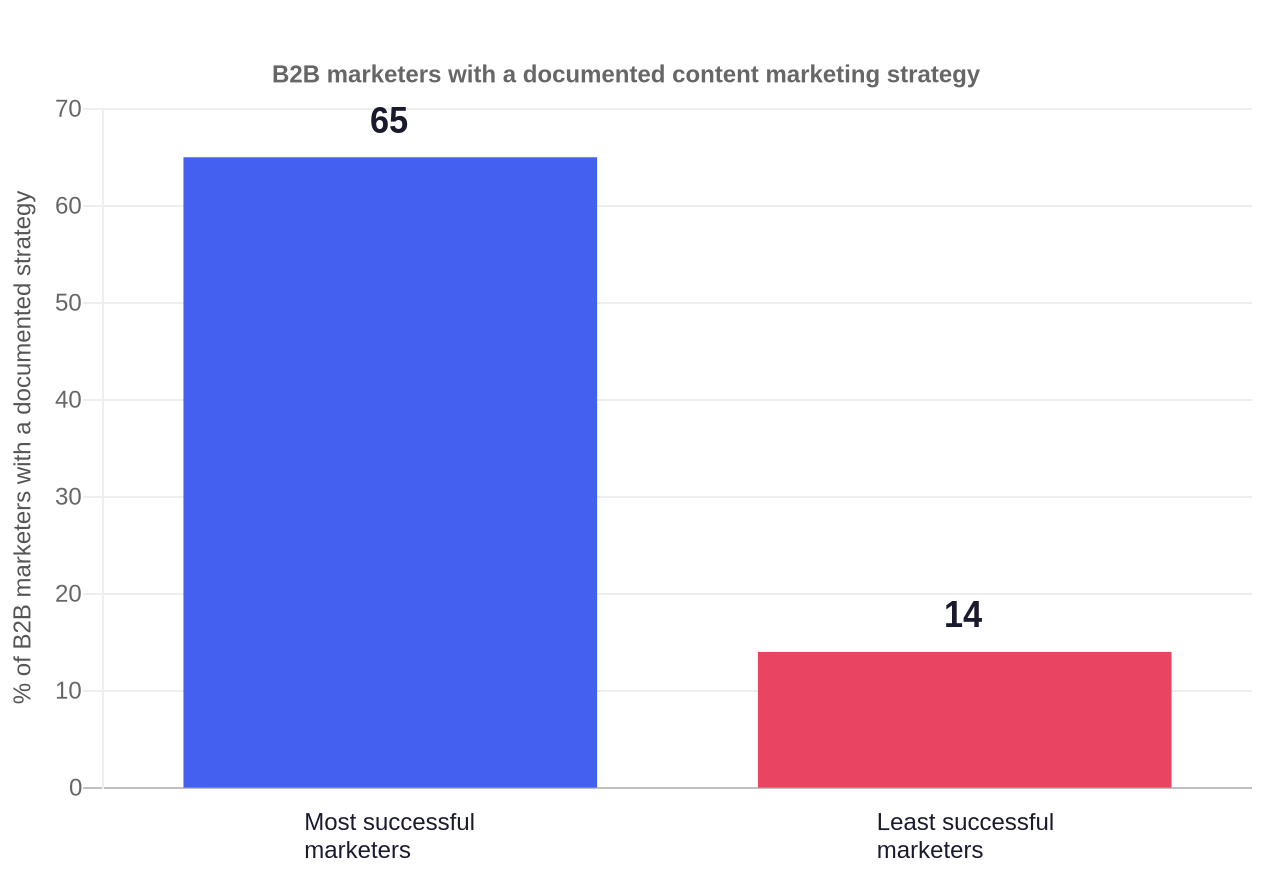
The strategic layer is where that documented strategy lives. Pull it out of the daily task list, keep it written, and review it quarterly. That single habit separates the teams that treat a calendar as a plan from the teams that treat it as a checklist.
Step-by-step: build a Two-Layer Calendar for your B2B team
Here is a five-step workflow for building both layers without overcomplicating them. The example throughout uses a fictional but realistic company called Northbeam Analytics, a B2B analytics vendor with a two-person content team and one part-time designer. The same steps apply at any size, with larger teams simply adding more owners and review checkpoints.
- Define your message pillars. Write down the three to five themes your brand can credibly own, based on what you know best and what buyers search for. Northbeam picks three: “product-led analytics,” “go-to-market measurement,” and “turnover-proof dashboards.” Each pillar becomes the top of a topic cluster.
- Map pillar themes to topic clusters. For each pillar, list the pillar page and the supporting posts that cover adjacent queries. Pillar pages run roughly 2,000 to 5,000 words as topical hubs, while supporting subtopic posts run closer to 1,000 words and link back to the pillar Kalungi. Northbeam’s “go-to-market measurement” pillar gets a pillar page and six cluster posts covering pipeline attribution, net revenue retention, and campaign influence.
- Attach goals and stage to every theme. Mark each piece as awareness, evaluation, or decision, and attach a measurable goal such as ranking for a keyword or being cited by an AI answer engine. Add the buying-committee role you are targeting, because B2B deals are reviewed by a committee of six to ten stakeholders on average ZoomInfo. Northbeam flags its “pipeline attribution” pillar page as evaluation-stage with a goal to rank top five for a mid-volume keyword.
- Turn themes into scheduled rows. Open a row in the operations schedule for each approved theme. Include the owner, writer, SME reviewer, due date, review SLAs, channels, and reuse tasks. Reserve 20 to 30 percent of capacity for reactive assets tied to breaking news or sudden sales requests, so a market shift does not derail the core plan ZoomInfo. Northbeam schedules its pillar page with Priya as owner, a freelance writer, and the head of product as SME reviewer, with a two-round edit SLA of 48 hours per round.
- Run a weekly operations review and a monthly reconciliation. Every Monday, confirm what is moving, what is blocked, and what slipped. Once a month, reconcile strategy with production. Northbeam’s weekly meeting takes thirty minutes and produces a list of dates to move and owners to chase. Its monthly reconciliation reconnects any drifting operations rows to the editorial themes they serve.
Organize production into six-to-eight-week sprints around a single core topic, broken down by persona and mapped across all channels, rather than scattering pieces across a daily schedule ZoomInfo. This is how B2B data provider Cognism scaled from five million to over forty million dollars in annual recurring revenue.
It plans high-value “Big Rock” assets and systematically slices each one into five to fifteen self-contained, platform-native “atoms,” scheduled over a four-to-six-week horizon Ahrefs. The full build of a Two-Layer Calendar takes one focused day, and you should get to a working version within a week rather than perfecting the strategy first.
Chart: planning horizons that map to each layer
The second data point that should shape your calendar structure is the planning horizon. The strategic editorial layer runs six to twelve months out, while the tactical content calendar runs one to three months out ZoomInfo. The chart below shows that range.
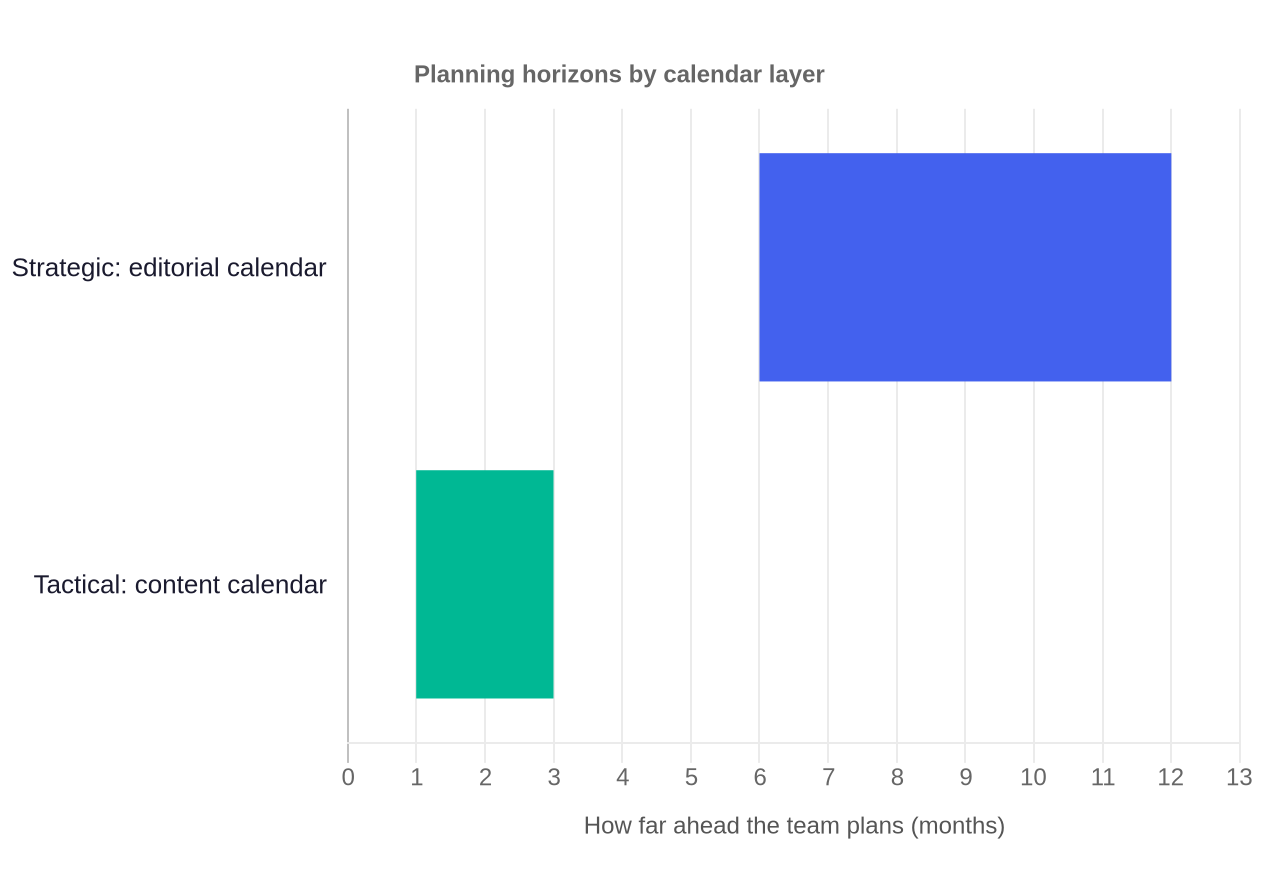
If your editorial plan only reaches as far as your next sprint, you are planning production, not strategy. If your production schedule only reaches twelve months out with no near-term detail, you are planning strategy, not execution. The two horizons should coexist, and the gap between them is where the workflow buffer lives.
What Most Teams Get Wrong
The biggest error is treating editorial and content calendars as interchangeable names for the same spreadsheet. That conflation is why so many B2B content programs are busy and aimless. The research surfaces six recurring mistakes, plus the fix for each.
- Mistake one: the calendar is the strategy. Teams write topics into a calendar and call it strategy. A topic list is not strategy. Strategy is the choice of themes, clusters, and goals. If your calendar is just dates and titles with no pillars or buyer-stage mapping, you have an operations schedule pretending to be a plan.
- Mistake two: over-engineering the editorial layer. The opposite failure is a fifty-row strategic document that nobody can update. The editorial layer should be a lean theme map, limited to one to three priority clusters and 12 to 16 quarterly pieces Kalungi. If it takes a day to update the quarterly plan, it is too heavy and it will go stale.
- Mistake three: over-scheduling against real capacity. Committing to five posts a week when your team and SMEs can only support two collapses the pipeline. A realistic schedule of two high-quality posts executed consistently outperforms overambitious, sporadic bursts Content Marketing Institute. Add a workflow buffer for SME review delays, because external contributors and reviewers will slip, and a buffer prevents one late review from derailing the whole queue Content Marketing Institute.
- Mistake four: no traceability between layers. A theme in the editorial layer and a row in the operations layer are only useful if they point at each other. When the connection is lost, teams discover in November that they published no content for a pillar that was supposed to be their flagship.
- Mistake five: approval loops without SLAs. Drafts languish in review purgatory because the process has no time-bound deadline. Put a 48-hour response SLA on every review checkpoint. Requiring a complete brief before drafting reduces revision rounds by up to 60 percent Content Marketing Institute.
- Mistake six: tracking vanity metrics instead of pipeline influence. Measuring the calendar by pageviews and impressions misses the point. High-performing teams measure stage conversion rates, deal velocity, and which assets are used in open opportunities ZoomInfo. Tying content to revenue is what turns a calendar from a task list into a pipeline engine, and it is the reason MongoDB cut sales cycles by 30 percent and grew revenue by 25 percent after restructuring its content delivery around buyer intent ZoomInfo.
Fix all six by making the Two-Layer split explicit and by holding a monthly reconciliation. The editorial layer changes quarterly or when a market event matters. The operations layer changes weekly as capacity and deadlines move. Keeping the two update cadences distinct is what stops a rigid schedule from strangling a flexible strategy.
Tooling: how to choose what to run your calendars on
You do not need a dedicated content marketing platform to run the Two-Layer Calendar. A spreadsheet is genuinely the right starting tool for most small B2B teams because it is cheap, collaborative, and easy to change. As your team grows, specialized tools add value in one specific way: they enforce the link between editorial themes and production tasks automatically, which manual spreadsheets let you lose.
| Option | Best for | Watch out for |
|---|---|---|
| Spreadsheet (Sheets, Excel) | Teams up to about five people, simplest setup | No built-in approval flows; links between tabs can break |
| Project tool (Asana, Notion, Monday, ClickUp) | Forcing owner, due date, and review SLAs into one view | Config can turn into a maintenance job |
| Dedicated content marketing platform (CoSchedule, ContentCal) | Teams that need approval workflows and multi-channel distribution in one place | Cost and onboarding; overkill for a two-person team |
| Separate research and planning tools | Teams that drown in raw keyword lists | Keep the active calendar lean; export only the 12 to 16 quarterly pieces Kalungi |
Match the tool to the bottleneck. Kalungi recommends a “two-tool” split: keep SEO research and idea backlogs in a database tool such as Notion or Trello, and export only the focused set of quarterly pieces into the active publishing calendar in Asana or Sheets Kalungi.
Showing stakeholders a list of a hundred raw keyword ideas creates friction. If your problem is missed dates and unclear ownership, a project tool that forces owner and due-date fields is the fix. If your problem is strategic drift where topics do not connect to goals, you need the editorial discipline more than new software.
How AI fits into your Two-Layer Calendar
AI changes where your calendar effort should go, not whether you need a calendar at all. Because first drafts and outlines are now fast, the scarce skills are topic selection, review, and distribution. Build your Two-Layer Calendar so the human effort concentrates on the editorial judgments that AI cannot make, such as which message pillars matter for the quarter and which SME feedback overrides the draft.
Use AI in the operations layer to speed up concrete tasks. Have it draft outlines from an approved theme, generate a first-pass brief, repurpose a published post into a newsletter variant, and suggest distribution copy.
Gate every AI-assisted piece with human review at the same SME checkpoints you already run, and attach a human-in-the-loop SLA to each generated stage Content Marketing Institute. The editorial layer should stay human-owned because it encodes judgment about positioning and buyer needs that a model does not have.
One practical way AI helps directly in calendar operations is refresh planning. A monthly scan can flag older posts whose keywords have decayed, so the editorial layer surfaces them for a refresh and the operations layer schedules the rewrite. Republishing and optimizing old content must occupy formal slots on the calendar, because ignoring the resources a refresh requires ruins scheduling capacity Ahrefs.
That keeps the calendar from being purely additive and lets a small team compound its existing assets. A 1:10 repurposing rule helps too: aim to generate at least ten distinct platform-native assets from every flagship piece, which is how Cognism distributes each Big Rock report across channels without producing net-new content from scratch Ahrefs.
FAQs
What is the difference between an editorial calendar and a content calendar? An editorial calendar is a strategic plan that lists the themes, message pillars, topic clusters, and buyer-stage goals a team will publish against.
A content calendar is an operational schedule that assigns each piece an owner, writer, reviewer, due dates, and distribution channels. The editorial layer decides what to say and why. The content calendar decides who makes it and when it ships.
Do B2B teams need both calendar types? Most do, but not all at once. A one or two person team can start with a light version of both, a theme list plus a simple schedule. Larger teams with multiple writers and SMEs need both formally because coordination and traceability become the bottleneck. Use the decision matrix in this guide to see which one to lead with based on your current failure.
Can I use the same spreadsheet for both? You can, but keep the two layers structurally separate even inside one file. Use separate tabs or clearly separated sections so one does not collapse into the other. The risk of a single combined view is that the strategic editorial plan quietly becomes a list of production tasks, which is the root cause of most calendar failures NYT Licensing.
What should go in an editorial calendar? Your message pillars, topic clusters, pillar and cluster pages, buyer-stage mapping, and the goal for each theme such as ranking for a priority keyword or being cited by AI answer engines. Keep it lean enough that one person can update the quarterly plan in under a day, and limit active clusters to one to three Kalungi.
How often should I update each calendar? The editorial layer changes quarterly or when a market event shifts your positioning. The operations layer changes weekly as capacity and deadlines move. Run a weekly operations review to move dates and chase owners, and a monthly reconciliation so strategy changes flow down into production.
What is the biggest mistake teams make with content calendars? Treating the calendar as the strategy. A list of dates and titles is not a plan. The fix is to build the Two-Layer Calendar so themes and goals live in an editorial layer, production logistics live in an operations layer, and every operations row traces back to an editorial theme.
What To Do Next
Start with the decision matrix. Name the failure you are actually suffering from today, then build the layer that fixes it. If you are not sure where to begin, build a light version of both in a single spreadsheet: one tab for your message pillars and topic clusters, one tab for the dated production schedule, with every production row pointing back to a theme.
Once the Two-Layer Calendar is running, keep the discipline of separate update cadences. Refresh the editorial layer quarterly and the operations layer weekly, and reconcile them monthly. Reserve reactive capacity, put SLAs on every review step, and measure pipeline influence rather than pageviews. That rhythm is what turns a busy content schedule into a coherent, measurable program.
If you want to go deeper on the operational side of running content for a small team, see our guide to the B2B Content Operating System, our 90 Day B2B Content Plan, and our B2B Content Workflow Template. These cover the planning and production machinery the Two-Layer Calendar plugs into.
