

A content production tracker is a single system that moves every content asset from idea to published to repurposed, while recording the owner, the due date, and the funnel stage each asset serves. Most teams build a calendar, not a tracker, and that is why they publish on time but never prove the work moved pipeline. This guide gives you a reusable tracker, the fields that matter, and a download you can put to work today.
Here is the short version. Build one tracker that runs every asset through six production stages. Each stage is a gate, not a label. Tie every asset to a funnel stage and a business objective. Add a work-in-progress limit per person so capacity, not ambition, sets your pace. Then repurpose every pillar asset instead of stopping at publish. That system is the difference between a content machine and a content graveyard.
Why most content trackers fail to move revenue
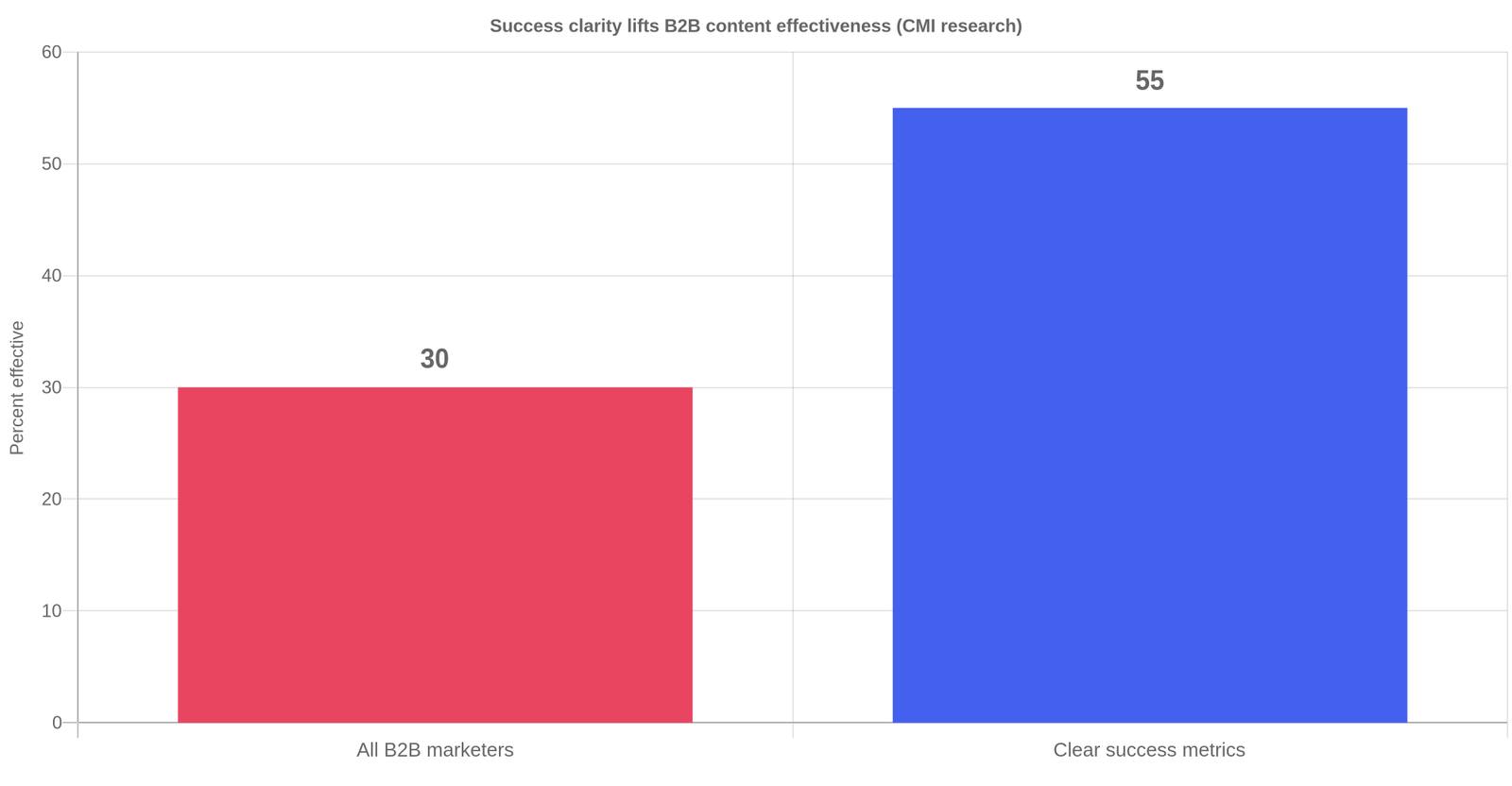
The Content Marketing Institute’s latest B2B research found only 30% of B2B marketers report their organization is effective at content marketing, down from 38% a year earlier. Teams that had a clear, documented definition of success jumped to a 55% effectiveness rate. That 25-point gap is not about writing skill. It is about whether the team knows, before it starts, what success looks like and how to measure it.
The cost of a chaotic production line is measurable. Project management research consistently shows that structured, timeline-based scheduling cuts the time teams spend administering tasks by around 40%, and a centralized process saved the agency Code and Theory more than 10,000 hours of labor. Those savings do not come from a faster writer. They come from a tracker that stops rework before it starts.
“Passion alone can’t cut it. For passion to survive, it needs structure.” That line, widely repeated in content operations work, captures why a tracker matters more than talent alone. The teams that outproduce their peers are not the ones with the better writers. They are the ones whose production line does not lose work. Cathy McKnight, a long-time content operations consultant, frames the goal in her framework as standardizing at least 70% of all organizational content through one aligned workflow, across every format from webinars to blog posts to dashboards.
Most trackers fail for one structural reason. They treat content as a list of tasks with a date, an owner, and a status, then stop at publish. Nobody records why the asset was made, who it was for, or what it was supposed to do. So when the request comes to defend the budget, the tracker has nothing to say about revenue. The calendar answered “are we publishing?”, it never answered “is this working?”
This is the gap the top template roundups miss. Airtable, Notion, Asana, Smartsheet, and HubSpot all publish excellent free templates. Almost all of them are flat single-tab lists. A row is a task. When an asset goes live, the work is marked done and the row sits still. That is a publishing schedule, and publishing schedules do not move pipeline.
What is a content production tracker vs a content calendar?
A content calendar schedules when assets publish. A content production tracker manages how assets are built. A calendar shows the publishing lane. A tracker shows every asset in the pipeline, the stage it is in, the owner moving it, and the business result it exists to drive. You can run a calendar and still lose track of work in review, because a calendar has no concept of workflow.
Here is a practical way to tell them apart. A calendar answers “what goes live next Tuesday?” A tracker answers “what is in intake, who is drafting, what is stuck in review, and what did last month’s pillar actually drive?” Once you see the difference, the reason most teams feel busy but unproductive is obvious. They optimized the output slot and ignored the production line.
The Lifecycle Six: an original production framework
To make this concrete, use the framework this guide names the Lifecycle Six. It runs every asset through six production stages, and each stage is a gate with a condition that must be met before the asset moves forward.
Stage 1, Intake. The idea is captured with three fields filled: the objective, the buyer persona, and the funnel stage. Nothing else is needed yet. Stage 2, Brief. A content brief is written and approved by the owner. This is where good work is won or lost. Stage 3, Create. The draft is written and handed to a reviewer. Stage 4, Review. The editor or subject matter expert approves it, revisions are closed, and legal signs off where needed. Stage 5, Publish. The asset goes live with correct metadata and internal links. Stage 6, Repurpose. The 1-to-N cascade is scheduled, turning one pillar asset into the formats your channels need.
The gate rule is what makes this a system and not a label. An asset cannot move from Create to Review until the draft exists. It cannot move from Review to Publish until approvals are recorded. If you want the gate visible, add a date to each stage transition. The moment a reviewer holds a draft for ten days, the tracker shows it in red.
A worked example
Picture a three-person B2B content team at a mid-market software company. They want to add a webinar to a paid funnel asset. With the Lifecycle Six, that webinar is one row. At intake they mark it BOFU and link it to the quarterly objective of 40 SQLs from owned media. The writer drafts it in Create. The demand gen lead reviews it in Review and notes that the call to action targets the wrong segment. That revision is recorded in the tracker, not in a thread nobody can find. When it publishes, the live URL goes in the same row. Three weeks later the repurpose rows show it became a whitepaper, three blog posts, ten social snippets, and an email sequence. The team can show leadership exactly what the webinar produced, in one view.

Choosing your tool: decision matrix
Every team lands somewhere between a blank spreadsheet and a full project management suite. The right tool scales with the number of people and the number of approvers, not with how impressive the tool looks. Use this matrix to pick where to start.
Where to run your tracker
| Option | Best for | Cost to run | Verdict |
|---|---|---|---|
| Flat spreadsheet (Excel / Sheets) | One or two people, one approver, low volume | Free, but manual | Start here. It holds 200 rows fine. |
| Relational tracker (the free download) | Lean teams linking assets to funnel and revenue | Free, plus 30 minutes to set up | Best default for most small B2B teams. |
| Airtable or Notion | Teams leaving spreadsheets, need views | Free tier, then $20+ per user | Great views, more setup. Good upgrade. |
| Asana, ClickUp, TeamGantt | 3+ people, multiple approvers, Gantt planning | $10 to $30 per user | Best once you have real workflow and capacity. |
The honest answer for most lean B2B teams is the relational tracker, the file you can download from this post. It gives you the funnel and revenue columns for free, stays flexible, and ports straight into Google Sheets so your team can edit together. Move to a paid tool only when your team, your approver count, or your volume outgrows a spreadsheet, which usually happens around three people and two reviewers. If you prefer structured, ready-made options before building your own, the Smartsheet content calendar templates are a reasonable reference for the fields larger teams expect.
How to build the tracker in 7 steps
Here is the step-by-step workflow for setting up a content production tracker that ties to revenue.
Step 1. Define 3 to 5 OKRs first
The tracker is only as good as the goals it serves. Write three to five quarterly objectives and give each a metric and a target. Use these in the objective sheet before you add any content. Defining success up front is the highest-impact move a content team can make.
Step 2. Build your fields
At minimum, track these columns: asset title, type, funnel stage, objective, owner, status, date due, and live URL. Add a computed check column that flags an asset when it is marked Publish or Repurpose but has no live URL. That check catches the “we think it went out, it never did” failure that quietly kills lead flow.
Step 3. Add the status dropdown
Use exactly the six Lifecycle Six stages as your status values. Restricting the dropdown keeps the team honest. Thirty statuses invite chaos. Six gates keep everyone aligned.
Step 4. Fill in funnel stage for every row
Classify each asset as TOFU, MOFU, or BOFU. This one column turns a tracker from a task list into a pipeline instrument. When you review the board, you see at a glance whether you are over-producing awareness content and starving the bottom of your funnel.
Step 5. Set a WIP limit per person
Lean teams drown when ten assets sit in review at once. Adopt a simple rule: no more than two assets per person in Create, and no more than two in Review, at any time. If a new intake would break that, park it or say no. Capacity is the gate everyone forgets to build.
Step 6. Publish and record the URL
When an asset goes live, the live URL goes in the row. Do not leave this for later. A tracker full of draft rows six months in is not a tracker, it is an abandoned wish list.
Step 7. Schedule the repurpose cascade
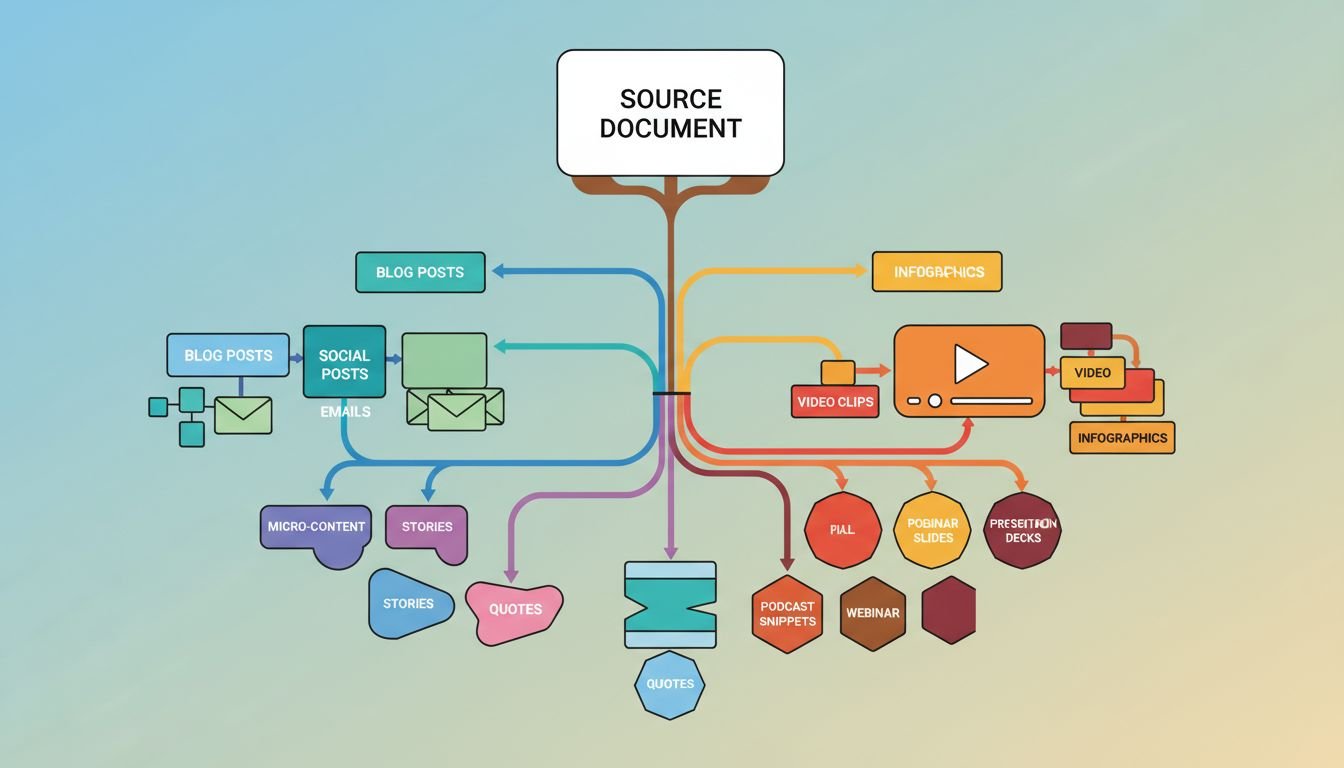
Before you mark an asset finished, decide its derivatives. One pillar asset should produce a plan for a whitepaper, three blog posts, ten social snippets, and an email sequence. The repurposing sheet in the download is where you plan that cascade instead of leaving it to “we will recycle this later,” which never happens.
How to adapt the tracker to your team size
The same six-stage tracker scales from one person to five without changing its logic. What changes is how much you automate and how many people touch each stage.
One person. You wear every hat, so the tracker is your memory. Keep it deliberately light: one sheet, the six statuses, and a weekly review. The main risk for a solo operator is not lost work, it is underestimating how much is in flight. The WIP-limit rule still applies, except now it is your own two slots in Create and two in Review. Treat it like a promise to yourself. The one-person operating plan on this site shows how to fit a tracker into a 90-day cadence without letting administration replace production.
Two or three people. This is where the relational tracker earns its keep. Split roles by stage: one person owns intake and the brief, one owns creation, one owns review and publishing. Funnel stage and objective become mandatory fields, because leadership starts asking what the content drove. Connect the tracker to an existing content workflow so each status change maps to a concrete handoff.
Four or five people. At this size, add a Gantt-style view or move to a tool that has one, because you need to plan capacity across people, not just track one asset at a time. This is also where you introduce automated review gates and reminders so nothing sits in Review for a week waiting on a single approver. Standardizing 70% of production through one workflow now saves real hours, and a centralized tracker keeps the whole board visible to stakeholders.
The sign you have outgrown a spreadsheet is not a preference for nicer views. It is when two people cannot update the same asset without conflicting edits, or when you cannot answer a revenue question from the board in under a minute. Until then, a spreadsheet that links assets to funnel and objective is the more honest tool, because it forces the discipline you would otherwise skip.
What to record after publish
A production tracker should hand off to measurement, not stop at a live URL. Add a lightweight follow-up review on each pillar asset, typically 30 days after publish, tracking three numbers: page views, leads attributed, and a note on which derivative formats performed. You do not need a full attribution stack. You need a field that asks, honestly, whether this asset earned its keep.
Record the results in the same row so the tracker becomes the single place where production and outcome meet. This is the difference between the 30% who feel their content works and the 55% who are effective because they defined success. Without the follow-up field, the tracker tells you effort happened. With it, the tracker tells you what effort paid.
What most teams get wrong
The most common mistake is stopping at publish. Teams celebrate a live post and move on, leaving the hardest work, turning one asset into many, undone. Publication is the midpoint of a content asset’s life, not the finish line.
The second mistake is confusing activity with output. A tracker full of in-flight rows looks productive but proves nothing. The moment a stakeholder asks what content drove pipeline, a task list has no answer. If your tracker does not record funnel stage and objective per row, you have built a busy schedule, not a pipeline instrument.
The third mistake is ignoring capacity. Teams assign work until the calendar is full, then blame individuals when deadlines slip. The fault is structural. Without a WIP limit, no single person owns the throughput number, so scope always wins. Add the capacity gate and the bottleneck shows itself in one board instead of in a month of missed dates.
The fourth mistake is maintaining thirty statuses. Every extra status is a place where work can stall invisibly. Six gates, clearly gated, beat a custom taxonomy nobody uses. Standardize at least 70% of your production through one core workflow and the exceptions stop eating your week.
What to do next
Download the content production tracker template, open it in Excel or Google Sheets, and fill in your three to five objectives before you add a single content row. Then add ten real assets, give each a funnel stage and an owner, and set your WIP limit. Run the board this week and the week after. You will see where work actually stalls, and that is the first honest map of your content operation.
To take this further, pair the tracker with a scoring model for deciding what to refresh. The tracker answers where work sits. The scoring model answers what to rebuild first. Together they turn a steady publishing cadence into a compounding refresh cycle.
Download the B2B Content Production Tracker (free): a ZIP file containing the Excel template. Extract it and open it in Excel or Google Sheets. It includes the Tracker sheet, the Repurposing sheet, and the objective sheet, all with dropdowns and live checks built in.
For one- and two-person teams, the lean team playbook and the content inventory template both rely on a working tracker. The playbook gives you the surrounding operating system, and the inventory sheet tells you what already exists before you plan the next quarter.
Frequently asked questions
What is a content production tracker?
A content production tracker is a single system that moves content assets from idea to published to repurposed while recording owner, due date, funnel stage, and objective. It differs from a calendar because it tracks workflow and business outcome, not just the publishing date.
What is the difference between a content calendar and a content tracker?
A calendar schedules when assets publish. A tracker manages how they are built and what they achieve. A calendar answers “what goes live next week?”, a tracker answers “what is in each production stage and what did the work drive?”
Should I use a spreadsheet or a project management tool?
Start with a spreadsheet for one or two people. Move to a tool like Asana or Airtable when you have three or more people, multiple approvers, or a need for Gantt-style capacity planning. The tracker in this post works in Excel and Google Sheets.
What fields should a content production tracker have?
Track asset title, type, funnel stage, objective, owner, status, due date, and live URL, plus a computed check that flags published assets with no URL. Add funnel stage and objective to tie production to pipeline.
What is a WIP limit in content production?
A WIP limit caps how many assets one person may have in a stage at once, typically two in Create and two in Review. It prevents overload, surfaces bottlenecks, and protects quality. Capacity is the gate teams routinely forget to build.
How do I track content repurposing?
Add a repurposing sheet that lists each pillar asset and its derivatives, the format, the channel, the owner, and the due date. Schedule the cascade before the pillar asset publishes so the work is planned, not left to later.
