

The best hosting for B2B SaaS landing pages is not the platform your app runs on. It is a cheap, fast, separate host built for marketing pages. For most teams that means Hostinger for budget speed, hosting.com (formerly A2 Hosting) when you want more headroom on shared infrastructure, and Liquid Web once paid campaigns push serious traffic. Your product can stay on Vercel or AWS. Your landing pages should not.
That separation is the part almost every guide on this topic skips. Search for SaaS hosting and you get two kinds of articles. One lists cloud platforms like Vercel, AWS Amplify, and Render, which are built for shipping applications, not for marketers who need to launch a campaign page by Thursday. The other lists landing page builders like Unbounce and Instapage, which solve the problem but start around $74 a month and lock your pages inside someone else’s platform. There is a third option sitting between them, and it is usually the right one for a small B2B team: a $3 to $30 per month host running WordPress or plain HTML, owned by marketing, decoupled from engineering.
This post walks through when each rung of that ladder makes sense, which hosts to shortlist, and how to set the whole thing up without touching your app’s deployment pipeline.
Why Landing Pages Should Not Live on Your App Infrastructure
Landing pages need a different owner, a different release cycle, and a different risk profile than your product, so hosting them on your app infrastructure creates friction in both directions. When marketing wants to spin up a page for a webinar, they should not need a pull request. When engineering deploys on a Friday, a checkout bug should not take your Google Ads destination pages down with it.
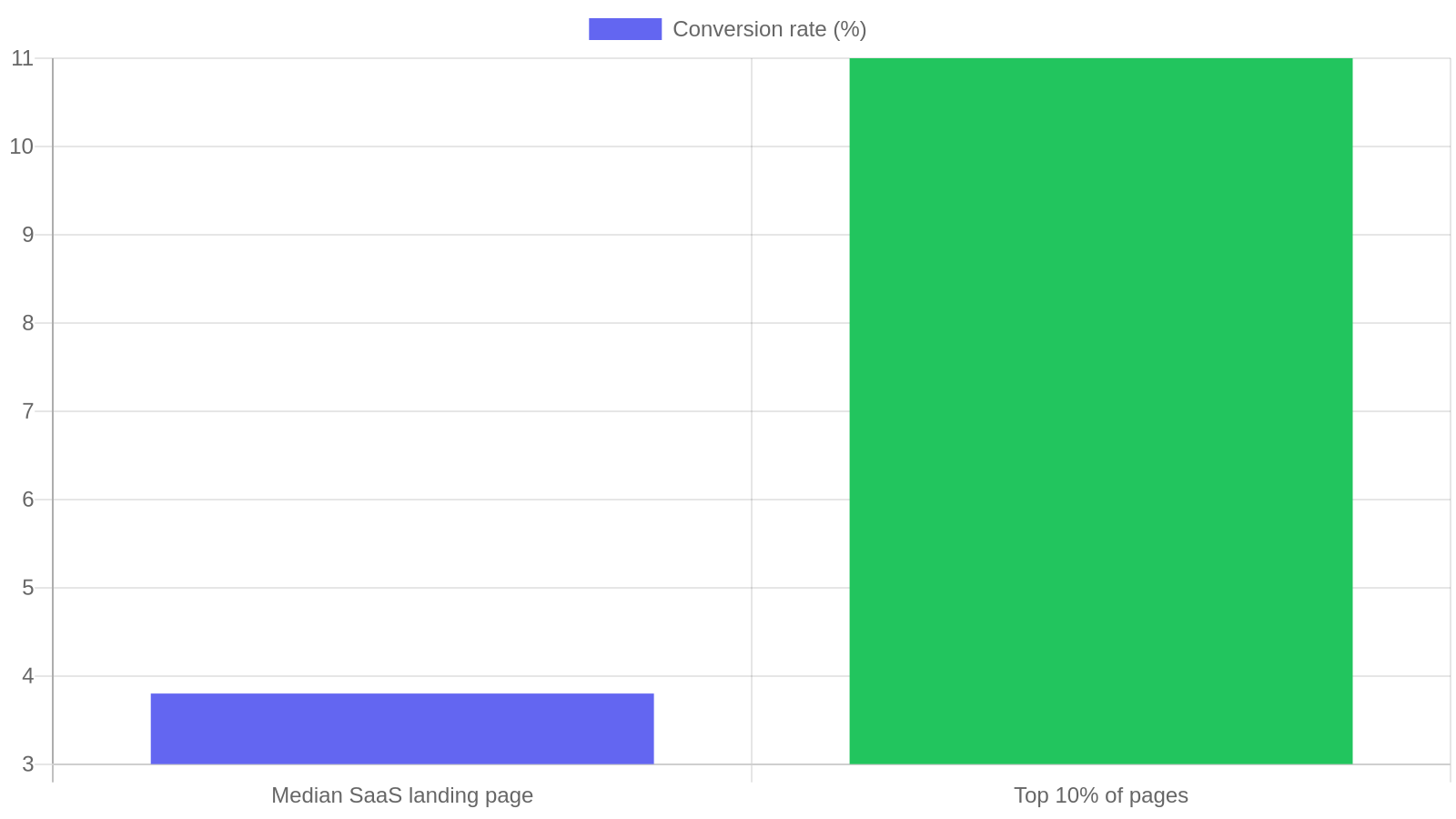
There is also a speed argument. Landing pages are conversion machines, and conversion is brutally sensitive to load time. Unbounce’s analysis of more than 41,000 landing pages found a median SaaS landing page conversion rate of just 3.8 percent, while the top ten percent convert at 11 percent or better. Around 79 percent of landing page visits now happen on mobile, where slow hosting hurts most. A dedicated host tuned for static-ish marketing pages, with aggressive caching and a CDN, gets you into fast territory for a few dollars a month. Your app’s infrastructure was tuned for API response times and database queries, not for serving a hero image to a phone on hotel wifi.
The practical pattern looks like this. The app lives at app.yoursaas.com on whatever engineering chose. The marketing site and every campaign landing page live at yoursaas.com or get.yoursaas.com on a cheap host marketing controls. DNS keeps them cleanly separated. Nobody files a ticket to change a headline.
The Landing Page Hosting Ladder
To pick the right host, match your monthly campaign traffic and team size to one of three rungs: shared hosting under 50,000 visits, turbocharged shared or cloud hosting up to about 200,000 visits, and managed VPS beyond that. That is the whole framework. We call it the Landing Page Hosting Ladder, and the point of it is that you start on the lowest rung that fits and move up only when traffic forces you to.
Rung one is standard shared hosting. If you are pre-launch or running a handful of always-on pages with modest paid spend, this is where you start. It costs less than a lunch per month and modern shared hosting with LiteSpeed caching is genuinely quick for lightweight pages.
Rung two is performance-tier shared or entry cloud hosting. You move here when campaign bursts start mattering: a product launch, a G2 feature, a LinkedIn post that actually lands. You are paying for more CPU headroom and better peak handling, not a fundamentally different product.
Rung three is managed VPS. You move here when landing pages are a revenue channel in their own right, with sustained paid traffic, A/B tests running constantly, and real money lost if a page is slow during a campaign. At this rung you also get a support team that treats downtime as an emergency.
The Three Hosts Worth Shortlisting
Shortlist one host per rung: Hostinger for shared, hosting.com for the performance tier, Liquid Web for managed VPS. We compared a much wider field in our B2B web hosting roundup, and for the specific job of serving marketing landing pages these three cover the ladder without overlap.
| Host | Ladder rung | Starting price | Best for | Main trade-off |
|---|---|---|---|---|
| Hostinger | 1: Shared | ~$3/mo | Pre-launch and early-stage marketing sites under 50k visits | Support depth is basic |
| hosting.com (Turbo) | 2: Performance shared | ~$10-25/mo | Campaign bursts, launches, growing paid traffic up to ~200k visits | Still shared infrastructure at peak load |
| Liquid Web | 3: Managed VPS | ~$25-45/mo | Landing pages as a revenue channel with sustained paid spend | Overkill and over-priced below ~200k visits |
Hostinger is the rung-one pick. Plans start around $3 per month, LiteSpeed servers and built-in caching make WordPress pages load fast without tuning, and the hPanel dashboard is simple enough that a marketer can manage everything solo. This site’s own experience with it is documented in our two-year Hostinger review. The trade-off is support depth: it is fine for routine issues, but you are not getting infrastructure engineers on chat.
hosting.com is the rung-two pick. Its Turbo plans claim significantly faster page serving than standard shared tiers, and in practice the extra resources show up exactly when you need them: traffic spikes from a launch email or a paid push. A2 also gives you more server-level control (staging, more generous resource limits) while staying in the $10 to $25 per month range. It is the sensible middle step before you commit to VPS pricing.
Liquid Web is the rung-three pick. Managed VPS starts around $25 to $45 per month and the difference is the management layer: proactive monitoring, real sysadmins on support, and infrastructure that does not blink at six figures of monthly visits. If your landing pages back a serious paid acquisition budget, this is cheap insurance. We put it head to head with a budget alternative in our Liquid Web vs HostGator comparison if you want the detailed case.
What about Vercel, Netlify, and the cloud platforms that dominate lists like SaaSBold’s SaaS hosting roundup? They are excellent for your application, and if your marketing site is a Next.js project maintained by developers, they are a fine choice. But they put engineering back in the loop for every page, which is the exact dependency this setup exists to remove. And what about landing page builders like Unbounce and Instapage, covered in depth in Pineable’s builder comparison? They are great at conversion tooling but you rent, never own: pricing starts around $74 a month, and migrating years of pages out later is painful. Self-hosted WordPress on the ladder above costs a tenth of that and the pages are yours.
How to Set Up Landing Page Hosting in an Afternoon

To stand this up, buy the hosting, point a subdomain or root domain at it, install WordPress with a lightweight theme, and connect your forms to your CRM. Here is the sequence we use:
- Pick your rung and buy the plan. Be honest about current traffic, not aspirational traffic. You can climb the ladder later in a weekend.
- Decide the domain structure. If marketing owns the root domain, host
yoursaas.comthere and let the app live onapp.yoursaas.com. If the root is stuck on app infrastructure, useget.yoursaas.comorgo.yoursaas.comfor campaign pages. Avoid a separate .co or .io domain: it splits your SEO authority. - Install WordPress with a lightweight stack. A fast theme (Astra, GeneratePress, or Kadence), one page builder or the block editor, and a caching plugin. Resist plugin sprawl. Every plugin is a speed tax on every campaign page.
- Wire forms into your CRM before launching anything. A landing page that collects leads into a spreadsheet nobody checks is decoration. Test the full path: form submit, CRM record, notification, follow-up email.
- Set a performance baseline. Run PageSpeed Insights on your first page and record the score. Every future page gets compared against it. If a new page is slower, find out what got added before you spend ad money driving traffic to it.
- Create a page template and clone it. Your fifth landing page should take 45 minutes, not a day. Templates are how a one-person marketing team behaves like a bigger one, the same principle behind the systems in our B2B SaaS content marketing playbook.
What Most Teams Get Wrong
The most common mistake is defaulting to whatever engineering already uses. It feels efficient and it costs marketing weeks of waiting per quarter. The second most common mistake is the opposite one: signing up for a premium landing page builder on day one, before there is any traffic to convert, and paying $900 a year for pages that get 40 visits a month.
Teams also routinely over-buy hosting. A pre-launch SaaS does not need a VPS. Fifty thousand visits a month is far more than most early-stage B2B marketing sites see, and shared hosting handles it comfortably when pages are lightweight. Spend the difference on ads or content.
The subtler mistake is ignoring page weight and blaming the host. A landing page carrying a 4 MB hero video, three tracking scripts, and a chat widget will be slow on any infrastructure. Before upgrading hosting, audit what the page loads. Cutting weight is free. Upgrading rungs is not.
And finally: teams forget that landing pages are content assets with a shelf life. They accumulate, decay, and quietly hurt you. Fold them into the same review cycle as your blog. Our content marketing ROI guide covers how to measure whether those pages actually earn their keep.
Frequently Asked Questions
Can I just host landing pages on the same Vercel project as my app?
You can, and small dev-led teams sometimes do. The cost is that every page change goes through engineering’s workflow. If your marketers can write and ship a page without a developer, keep it there. If they cannot, separate hosting pays for itself with the first campaign.
Is WordPress fast enough for high-converting landing pages?
Yes, if you keep it lean. WordPress on LiteSpeed hosting with a lightweight theme and caching routinely scores 90+ on PageSpeed Insights. Slowness comes from heavy themes and plugin sprawl, not from WordPress itself.
Should landing pages be on a subdomain or a subdirectory?
Prefer the root domain or a subdirectory when you control the domain, since consolidated authority helps every page rank. Use a subdomain like get.yoursaas.com only when the root domain is locked to your app infrastructure and moving it is not practical.
When should I move up a rung on the hosting ladder?
Move up when performance degrades under real traffic, not before. Watch two signals: server response time creeping up in PageSpeed Insights during campaigns, and any downtime during a paid push. One bad campaign day usually costs more than a year of the next rung.
Do I need a landing page builder like Unbounce at all?
Only when testing velocity becomes the bottleneck. If you are running many A/B tests a month across a large paid budget, builder tooling earns its fee. Below that, WordPress plus a template gives you 90 percent of the result at roughly a tenth of the cost.
What To Do Next
Pick your rung from the ladder today. If you are pre-launch or under 50,000 monthly visits, start with Hostinger and you will be live this afternoon. If campaigns already spike your traffic, go straight to hosting.com’s Turbo tier. If landing pages carry a serious paid budget, price out Liquid Web and treat it as campaign insurance.
Then do the unglamorous parts in order: separate your marketing domain from your app, build one fast page template, wire forms into your CRM, and record a performance baseline. Avoid the two expensive traps, which are hosting marketing pages on engineering’s infrastructure and paying builder prices before you have builder-scale traffic. The teams that win with landing pages are not the ones with the fanciest stack. They are the ones who can ship a fast page by Thursday without asking anyone’s permission.
