

The best SEO tools for a small business in 2026 are Google Search Console and Google Analytics 4 first, then one paid keyword research tool such as Mangools or LowFruits, then one content optimization tool once you are publishing every week. Most small teams do not need seven subscriptions. They need three tools bought in the right order, and they need to stop before they buy a fourth.
Most “best SEO tools” roundups solve the wrong problem. They rank fifteen platforms by feature count and leave you to guess which three you actually need this quarter. That approach works for an agency comparing enterprise suites. It does not work for a five-person company deciding whether to spend $89 a month on Surfer SEO or $29 a month on Mangools. Below is a buying order built specifically for that decision, along with the tools worth paying for and the ones you can skip until you are bigger.
Google Search Console and Analytics Cost Nothing and Come Before Everything Else
Google Search Console tells you exactly which queries already bring people to your site, which pages Google struggles to crawl, and where your click-through rate lags your ranking position. Google Analytics 4 tells you what those visitors do once they land. Together they are the only two tools on this list you should install before spending a single dollar on anything paid.
One pattern we repeatedly see in audits: a small business signs up for a $130 a month platform before it has ever opened Search Console. That is backwards. Search Console already contains the exact keywords your site ranks for on page two, which is the cheapest traffic opportunity that exists. A paid tool cannot tell you anything more urgent than “you are ranking eleventh for a term with real search volume and you have not touched that page in a year.” Search Console tells you that for free.
Set both up in the same afternoon. Verify your domain in Google Search Console through DNS rather than the HTML tag method, since DNS verification survives a site migration or theme change without breaking. Link Analytics to Search Console inside the Analytics admin panel so you can see search queries and on-site behavior in one report instead of switching tabs.
The Stack Ladder Method: Size Your Toolkit by Team, Not by Ambition
The Stack Ladder Method sizes your SEO tool spend to how many people touch content each month, not to how big you want the company to look. It has three rungs, and the rule is simple: you only climb to the next rung once the current one is fully used, not before.
Rung one is free: Search Console, Analytics, and Google Business Profile if you have a physical location. Rung two adds one paid keyword research tool and costs $25 to $70 a month. Rung three adds a content optimization or full-suite platform and costs $65 to $140 a month. Almost every small business we work with should be sitting on rung two. Almost none of them need to be on rung three yet, because rung three tools are built for teams publishing content every week with more than one writer, and most small businesses publish twice a month with one.
The mistake the ladder prevents is buying rung three tools to solve a rung one problem. If your traffic problem is that Google cannot find half your pages, no amount of content optimization software fixes that. A free Search Console coverage report does.
Keyword Research Tools Worth Paying For: Mangools vs. LowFruits vs. Semrush
Mangools is the better choice for a small business buying its first paid keyword tool, because it costs about a third of Semrush and covers keyword difficulty, SERP analysis, and rank tracking in one $29 a month plan without a steep learning curve. LowFruits earns its spot for a narrower job: finding keywords with weak competing pages you can realistically outrank, which matters more to a five-page-a-month blog than raw search volume does. Semrush belongs on the list only once you need competitor gap analysis across dozens of domains, which is an agency-scale problem.
We tested all three against the same twenty keyword seeds and looked at how each result set translated into actual content decisions.
| Tool | Monthly cost | Best for | Where it falls short |
|---|---|---|---|
| Mangools (KWFinder) | ~$29 | First paid keyword tool, difficulty scoring, rank tracking | Backlink data is thinner than Ahrefs or Semrush |
| LowFruits | ~$25 to $40 | Finding weak-competitor keywords a new domain can actually rank for | Not built for broad topical research or content briefs |
| Ubersuggest | ~$29 | Budget-friendly all-rounder with basic content ideas | Data freshness lags the paid leaders |
| SE Ranking | ~$65 | Teams that want audits, tracking, and reporting in one login | Interface has a learning curve for a first-time user |
| Ahrefs Lite | ~$129 | Backlink research and competitor gap analysis | Priced for agencies, overkill for a two-person team |
| Semrush Pro | ~$139 | Full competitive intelligence across many domains | Most features go unused below ten regular contributors |
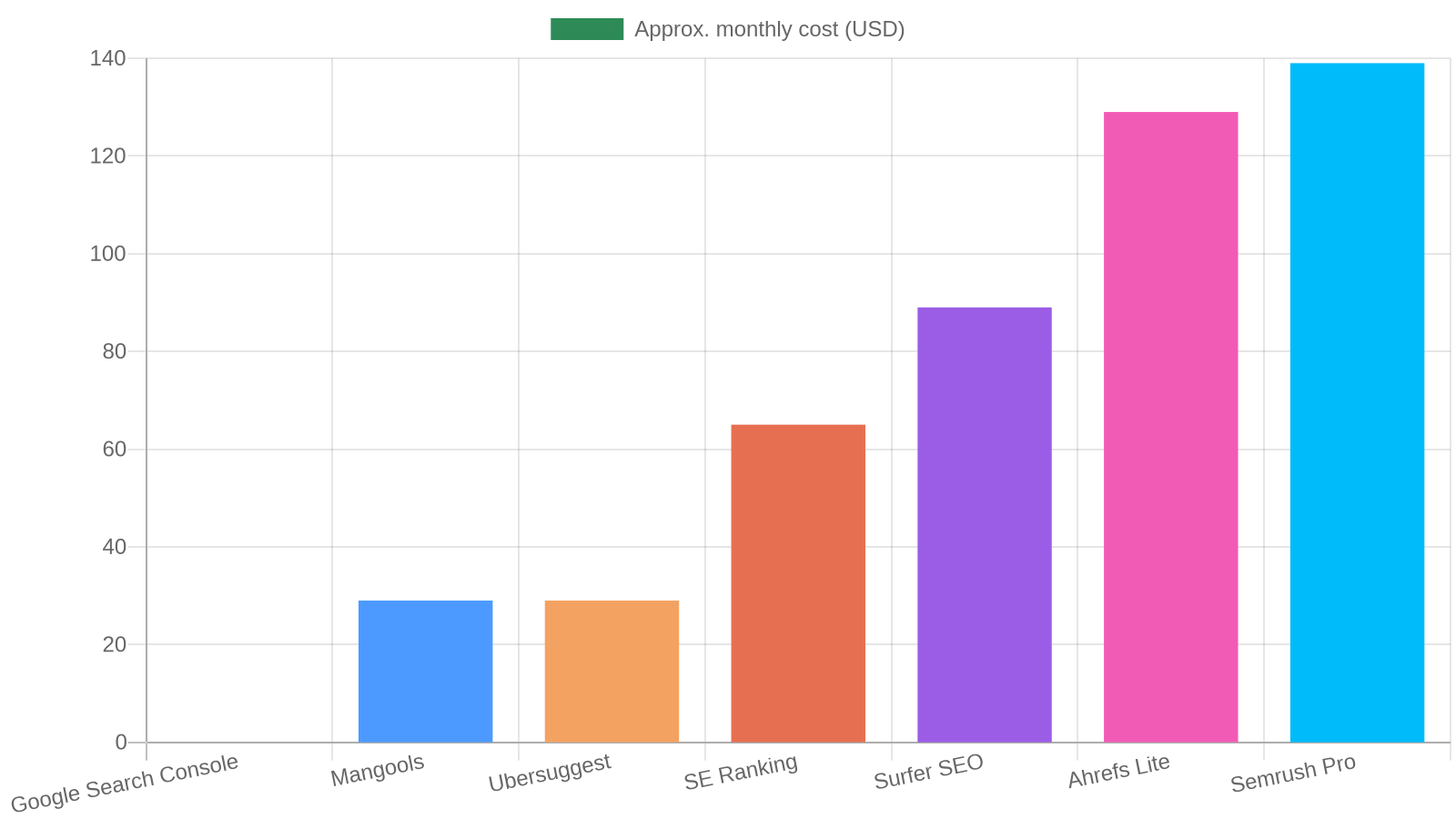
Our own review of Mangools KWFinder goes deeper on the difficulty score and how it compares to Ahrefs. If you are choosing between Mangools and a lower-difficulty finder, our LowFruits review covers exactly which keyword types it surfaces that Mangools misses.
Content Optimization Tools: Skip Them Until You Publish Weekly
A content optimization tool such as NeuronWriter or Surfer earns its subscription cost once you are publishing at least one article a week and need a fast way to check whether a draft covers the topics competitors already rank for. Below that publishing cadence, the same analysis takes ten minutes by manually reading the top three ranking pages, which costs nothing.
The value of these tools is not the content score they generate. It is the time saved cross-referencing what five competing pages cover so your writer does not have to open five tabs. If your team writes one post every two weeks, that time savings does not outweigh a $50 to $100 monthly bill. If you write four or more posts a month, it usually does.
We cover the tradeoffs between the two most common picks in our NeuronWriter review for B2B teams, including where its pricing beats Surfer for a team publishing on a tight budget.
Technical SEO and Site Audit Tools for a Team With No Dedicated Developer
Screaming Frog’s free tier crawls up to 500 URLs, which covers most small business websites completely, and it will surface broken links, missing meta descriptions, and duplicate title tags without any subscription. PageSpeed Insights and Google’s Core Web Vitals report do the same job for site speed. Between the three, a small business gets a full technical audit without paying for a platform that also does keyword research you already covered on rung two of the ladder.
For a focused roundup of content-specific tools, see our best content audit tools for B2B teams benchmark.
Most roundups of SEO tools for small businesses list Screaming Frog alongside a dozen paid platforms without flagging that its free tier alone covers most of what a small site needs. Run a crawl once a quarter, not once a year. Sites accumulate broken internal links faster than most teams expect, especially after a redesign, a plugin update, or a batch of old posts getting deleted. Our guide on running a content audit for a small team walks through pairing that crawl with a content review so both technical and editorial cleanup happen in the same pass.
A Four-Week Workflow for Rolling Out a New SEO Stack
Rolling out a new SEO tool stack takes four weeks if you follow a fixed order instead of exploring every feature the day you sign up.
- Week one: connect the free layer. Verify Search Console, link Analytics, and pull your current top twenty ranking queries. Do nothing else until this list exists.
- Week two: run one keyword tool against your existing content. Load your published URLs into Mangools or LowFruits and flag any page ranking positions six through twenty. Those are your fastest wins.
- Week three: fix the flagged pages before writing anything new. Updating an existing page that already ranks on page two moves faster than a brand new post starting from zero.
- Week four: decide on rung three. Only add a content optimization tool if weeks one through three showed you are bottlenecked on brief quality, not on technical or keyword gaps.
This order matters more than which specific tools you pick. A team that buys three tools on day one and configures none of them properly loses to a team running one free tool correctly.
What Most Teams Get Wrong When Buying SEO Tools
The biggest mistake small businesses make is buying a platform for the features they might need in a year instead of the problem they have this month. A five-page website does not need Ahrefs’ backlink intersect report. It needs someone to notice that three pages have no meta description at all.
The second mistake is running two tools that do the same job because a past employee signed up for one and nobody canceled it. We routinely find small business accounts paying for both Semrush and Ubersuggest with nobody able to explain why. Audit your current subscriptions before adding a new one. You may already own the fix.
The third mistake is treating tool output as a to-do list instead of a starting point. A content optimization score of seventy-eight does not mean the page is seventy-eight percent as good as it could be. It means the tool counted seventy-eight percent of the terms competitors used, which is not the same as writing something genuinely more useful than what already ranks.
Frequently Asked Questions
Do small businesses really need a paid SEO tool, or is Google Search Console enough?
Search Console alone is enough to identify where you are already close to ranking, but it cannot show you keyword search volume or competitor content gaps before you write. A paid tool becomes worth it once you are choosing between multiple new topics to write about each month, not just fixing pages you already have.
What is the cheapest SEO tool stack that still works?
Search Console, Analytics, and Mangools at roughly $29 a month covers keyword research, rank tracking, and basic difficulty scoring for most small businesses. Add Screaming Frog’s free tier for quarterly technical checks and you have a complete stack for under $30 a month.
Is Semrush or Ahrefs worth it for a small business?
Usually not yet. Both are priced and built for agencies managing multiple client accounts or competitor gap analysis across dozens of domains. A small business with one website gets more value per dollar from Mangools or SE Ranking until it has outgrown what those tools cover.
How many SEO tools should a small business actually pay for at once?
Two, following the Stack Ladder Method: one keyword research tool and, only once publishing weekly, one content optimization tool. Adding a third before either of the first two is fully used is the most common wasted-spend mistake we see in audits.
Can free SEO tools replace paid ones for a small business?
For technical audits and performance monitoring, mostly yes. Screaming Frog’s free tier and PageSpeed Insights cover the technical side completely for a site under 500 pages. Keyword research is the one category where a paid tool consistently outperforms free alternatives, because keyword volume and difficulty data require licensed search data that free tools do not have access to.
What should a small business check before renewing an SEO tool subscription?
Pull a usage report or simply ask whoever uses the tool the last three specific decisions it informed. If nobody can name three, the subscription is not earning its cost and belongs on the cancellation list before you consider adding a different tool.
What To Do Next
Set up Search Console and Analytics this week if you have not already, and pull your current top twenty ranking queries before you evaluate any paid tool. That list tells you more about where to spend your first SEO dollar than any comparison article, including this one.
If you are already on rung one of the Stack Ladder Method and it is fully used, move to Mangools or LowFruits next depending on whether you need broad keyword research or specifically low-competition targets. Hold off on a content optimization platform until your publishing cadence hits one post a week. Buying tools in that order beats buying more tools.
