

Quick Answer: Can LowFruits find easy-to-rank keywords?
Yes, LowFruits specializes in finding low-competition keywords where the top results include weak pages (forums, Reddit, low-DR sites) that are easier to outrank. It analyzes SERP results for "weak spots" — pages with no backlinks or low authority — and scores them so you can target keywords where you have a realistic chance of ranking even at DR 1–20. For B2B solo founders targeting niche, buyer-intent keywords, LowFruits is one of the most cost-effective keyword research tools available.
Disclosure: Some links in this post are affiliate links. If you sign up through them, I may earn a commission at no extra cost to you. I only recommend tools I believe are genuinely useful.

I spent three months testing this tool for my niche sites, and this lowfruits review will show you if it actually saves time. Many tools promise to find easy keywords. Most of them fail because they rely on basic formulas that do not match what Google actually does. I wanted to see if this tool could do better. I paid for my own credits and put it to work on three of my blogs. Here is what I found.
Why traditional KD is broken
If you have done keyword research before, you know about Keyword Difficulty. Most people call it KD. Big tools calculate this number by looking at the top ten pages ranking for a keyword. They count how many backlinks those pages have. If those pages have very few backlinks, the tool says the keyword is easy. It gives you a low KD score, maybe a 5 or a 10.
But this score is often wrong. It does not look at the authority of the domains. If a huge site ranks for a keyword with zero backlinks to that specific page, the tool still calls it easy. But your small blog with low authority will not beat that huge site. Google trusts that huge site too much. The KD score misses this completely.
Another issue is search intent. Sometimes a keyword has a low KD because nobody has written a good article about it. But when you look at the search results, Google is only showing videos or shopping pages. If users want to buy a product, Google will not rank your informational blog post, no matter how low the KD score is. This is why looking at the actual search results is the only way to find real opportunities. Doing this by hand takes hours. That is where this software comes in.
What is LowFruits?
This tool takes a different approach. Instead of guessing difficulty based on backlinks, it analyzes the actual search results. It looks for weak spots on the first page of Google. A weak spot is a page that Google does not really want to rank, but has to because there are no better options.
Think about forums. When you search for a specific question and see a Reddit thread or a Quora post on page one, that is a sign of a weak spot. Google prefers high-quality articles. If it has to show a forum thread from five years ago, it means there is a gap. If you write a great, focused article on that topic, you can often take that spot.
The software automatically scans thousands of search results. It highlights these weak spots using simple icons. This allows you to scan a list of hundreds of keywords in just a few minutes. You can instantly see which ones have forums, social media, or small blogs ranking on page one. It saves you from opening fifty different tabs to check the search results yourself.
Understanding the Weak Spot Icons
Affiliate link — we earn a small commission at no extra cost to you.
When you look at your reports, you will see small fruit icons next to each keyword. These visual markers make the data easy to understand at a glance. Here is what they mean.
Green fruits represent user-generated content. This includes sites like Reddit, Quora, and public forums. It also includes social media platforms like Pinterest or Facebook. When you see a green fruit, it means a regular person wrote a post or a comment, and Google decided to put it on page one. This is the easiest type of competition to beat.
Blue fruits represent small websites. These are blogs or niche sites with low domain authority. The tool checks their authority score. If a small blog can rank on page one, your blog can probably rank there too. It proves that Google is willing to rank smaller, focused sites for this specific query.
Yellow fruits represent medium-sized sites or e-commerce shops. If you are writing an informational post and see an e-commerce shop ranking on page one, it means Google is desperate for content. Online shops do not usually have long, helpful articles. They just have product pages. Your detailed guide can easily offer more value to the searcher.
The Credit System vs Subscriptions
One of my favorite things about this tool is how you pay for it. Most SEO tools force you into an expensive monthly plan. You pay a hundred dollars or more every single month. If you get busy with your day job, or if you take a vacation, you still pay that money. You feel like you are wasting your budget.
This software offers a subscription, but it also offers a pay-as-you-go credit option. You can buy a pack of credits, and they never expire. I started by buying 2,000 credits for a small fee. I used some of them in my first week. Then I spent three weeks writing content. I did not do any keyword research during that time. I did not have to worry about a monthly bill because my remaining credits were sitting there waiting for me.
You only spend credits when you analyze the search results for a keyword. Generating a list of keyword ideas is completely free. You can type in a topic, get a list of 2,000 ideas, and not spend a single credit. You only spend credits when you select the most promising ideas and ask the tool to find the weak spots for them. This makes your budget go much further.
Key Features I Use Every Week
This tool has several features that make my workflow much faster. Here are the ones I find myself using the most.
The Wildcard Search
This is my favorite way to find long-tail keywords. You can use an asterisk as a placeholder in your search. For example, if you type in “how to clean * boots”, the tool will find searches like “how to clean leather boots”, “how to clean suede boots”, and “how to clean hiking boots”. This is a great way to find highly specific topics that bigger tools often miss.
Keyword Clustering
When you analyze a lot of keywords, you often get duplicates with slightly different wording. For example, you might get “how to grow tomatoes indoors” and “growing tomatoes inside”. If you write two separate articles for these, you will end up competing with yourself. The clustering feature automatically groups these keywords together. It tells you which searches have the same intent. This way, you know you only need to write one comprehensive post to cover all of those variations.
Google Search Console Integration
You can connect your Google Search Console account directly to the tool. It will pull in all the keywords you are already ranking for on pages two, three, or four. Then, it will analyze those keywords to see if there are weak spots on page one. If you find a keyword where you are ranking on page two, and there is a Reddit thread on page one, you can update your article to quickly jump to the first page.
The Domain Filter
You can set up a list of domains that you want to ignore or highlight. For example, if you have a few direct competitors in your niche, you can add them to your list. The tool will highlight them whenever they show up on page one. This helps you track what your competitors are doing without having to search for each term manually.
My Keyword Research Process
Here is exactly how I use this tool to find topics for my blogs. I will use a gardening niche as an example.
1) I go to the search bar and type in my seed keyword. I will use “grow * in pots”. I use the asterisk because I want to find specific plants that people want to grow in containers. Before I hit search, I make sure to select my target country, which is usually the United States.

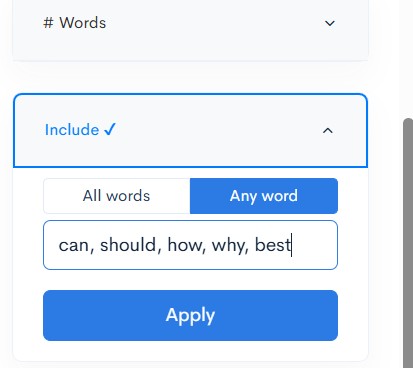
2) I use the pre-filters. This is where I save my credits. I tell the tool to only import keywords that contain informational words like “can”, “should”, “how”, “why”, or “best”. I do not want to import keywords like “cheap pots” or “pots for sale” because those are commercial terms. I only want to write helpful informational articles.
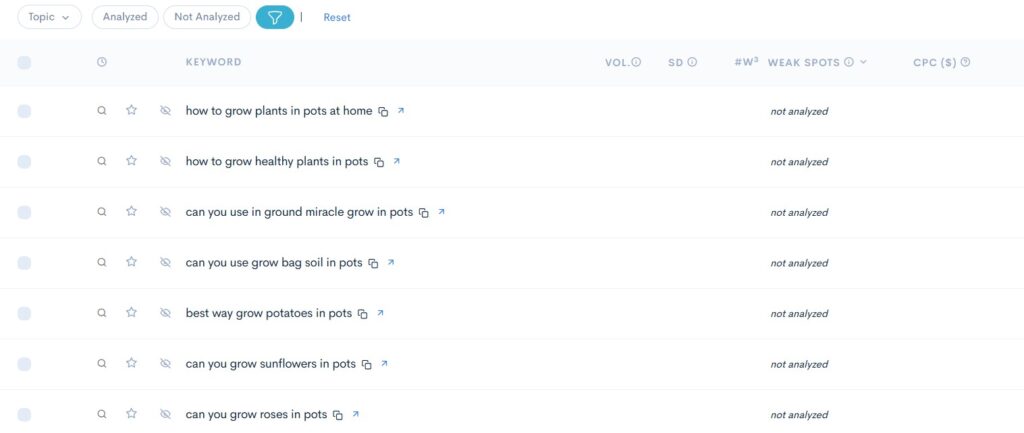
3) I run the search. The tool generates a list of hundreds of keyword ideas. This step is free. I scan the list and delete any keywords that make no sense. Once I have a clean list of about three hundred keywords, I select them all and click the analyze button. This is where I spend three hundred credits.
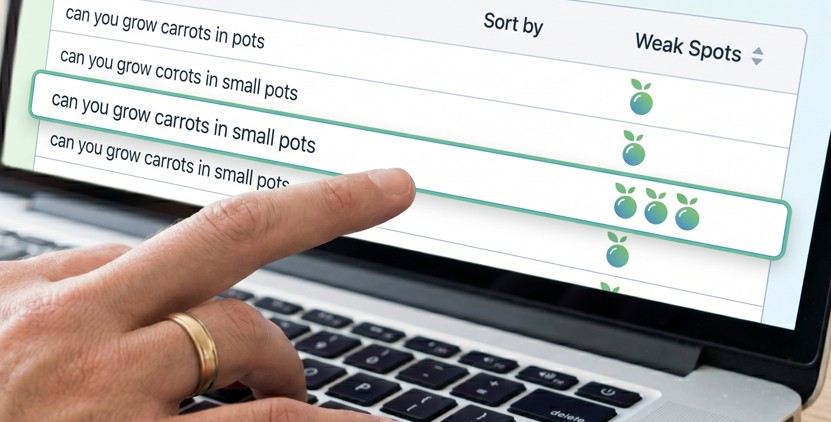
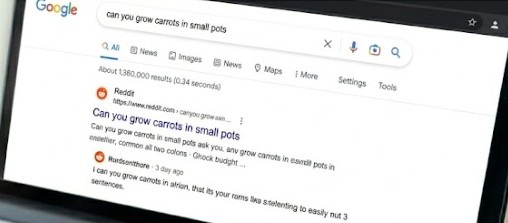
4) I look at the results. I sort the list by the number of weak spots. I look for keywords that have at least two green fruits. For example, I might see “can you grow carrots in small pots” has three green fruits. This means there are three forums or social media posts on page one of Google.
5) I click on the keyword to view the actual SERP. I want to see what those forums are saying. If I see a Reddit post where someone asked the question and got a short, three-sentence answer, I know I can do better. I will write a detailed, helpful post with clear instructions and images. I know I have a great chance of ranking on page one because Google is currently forced to show that short forum post.
To understand why Google ranks forums and how you can create content that beats them, you can read the Google Search Central helpful content guidelines. This will help you format your articles to match what search engines are looking for.
The Bad Parts: My Honest LowFruits Review
No tool is perfect, and this lowfruits review would not be honest if I did not mention the things I dislike. Here are a few issues I have run into during my testing.
The interface can be very confusing at first. There are a lot of buttons, tabs, and filters. When you first look at a completed report, you might feel overwhelmed by all the icons and numbers. It took me about three days of regular use to feel comfortable with the layout. I wish they had a simpler view for beginners.
You can easily waste credits if you are not careful. If you import a list of 2,000 keywords and click “analyze” without setting up your filters, you will burn through twenty dollars worth of credits in a few minutes. The tool does not warn you before you do this. You have to learn how to use the pre-filters to protect your budget.
The search volume data is not always up to date. The tool gets its search volume numbers from Google Keyword Planner. Like all SEO tools, these numbers are just estimates. Sometimes the tool says a keyword has zero searches per month, but when you write the article, you get fifty visitors a day. You have to learn to trust the weak spots more than the search volume numbers. If people are talking about a topic on Reddit, there is search volume, even if the tool says there is none.
LowFruits vs Ahrefs and SEMrush
People often ask if they can replace their expensive SEO tools with this one. The answer depends on what you need.
Ahrefs and SEMrush are massive platforms. They do a lot of things. They track your daily rankings, analyze backlink profiles, perform technical site audits, and help you spy on your competitors. If you are a professional SEO agency managing twenty clients, you need those features. This tool cannot replace them.
But if you are an independent blogger or a niche site owner, you probably do not need all of those features. You just need to find easy keywords so you can write articles and get traffic. If that is your main goal, paying a hundred dollars a month for a massive tool is a waste of money. This software does one thing incredibly well. It finds low-competition keywords faster and more accurately than the big tools, and it costs a fraction of the price.
You can also read the Wikipedia page on Search Engine Optimization to understand how keyword research fits into the bigger picture of SEO.
Who Should Use This Tool?
I recommend this software to niche site builders who want to find long-tail keywords quickly. It is also great for freelance writers who want to pitch ideas to clients that are guaranteed to have low competition. If you are on a tight budget and cannot afford a monthly subscription, the pay-as-you-go credit system is perfect for you.
If you are a large company with a huge marketing budget, you might find the tool too limited. You will probably want a tool that offers deeper backlink analysis and technical site auditing. But for individual creators, it is one of the most useful tools available today.
Affiliate link — we earn a small commission at no extra cost to you.
Practical Steps to Get Started
If you want to try it out after reading this lowfruits review, do not buy a large package right away. Start with these simple steps.
1. sign up for a free account. They usually give you some free credits to test the system. Use these credits to analyze a small list of keywords in your niche.
2. run a wildcard search. Use a formula like “how to * [your topic]” or “can you * [your topic]”. This will give you highly specific questions that real people are asking.
3. look for keywords with at least two green fruits on page one. This means there are forums ranking for those terms. Check the forum threads to make sure they do not have great, detailed answers.
4. write one highly focused article answering one of those questions. Make it better than the forum posts. Publish it on your blog and monitor its position over the next few weeks. You will likely see it rank much faster than your other articles.
Looking for budget-friendly hosting to pair with your SEO stack? See my honest Hostinger review after two years of use.
