

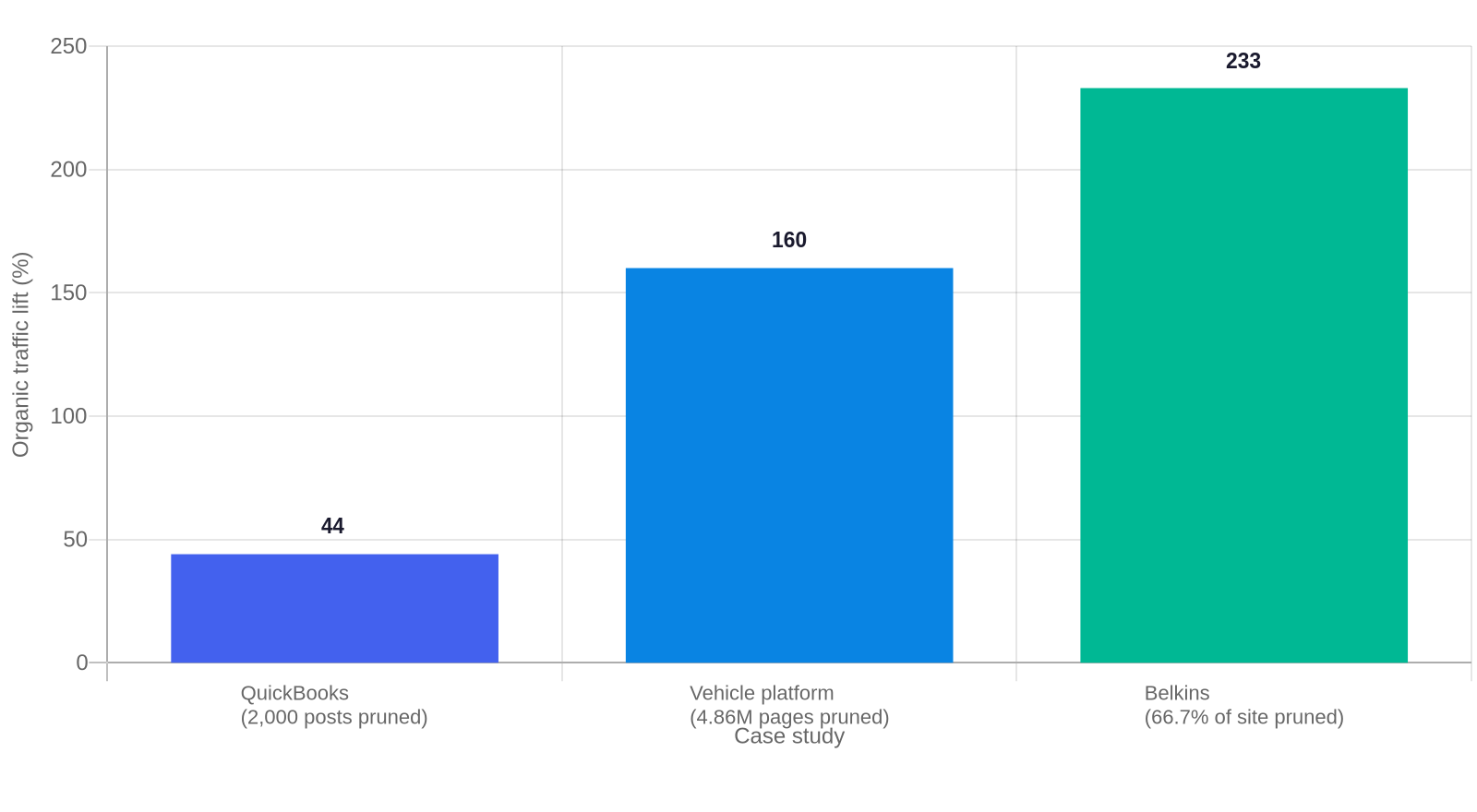
Content pruning is the process of removing, redirecting, noindexing, or rewriting the weakest pages in your B2B blog so the pages that remain rank higher and convert better. It is not a cleanup chore. Done right, it is one of the highest-return actions a small B2B content team can take, and the evidence is specific. An Animalz case study documented how QuickBooks deleted 2,000 blog posts, about 40% of its Resource Center, and organic traffic rose 44% by peak season with a 72% jump in signups. Ahrefs details a vehicle platform that ran 4.86 million programmatic pages down to 1,500 and saw organic visits climb 160% with conversions up 105%. Belkins removed roughly two-thirds of its site and grew monthly organic traffic from 3,000 to nearly 10,000 visits.
Most top-ranked guides frame pruning as a mechanical exercise: run a crawler, find zero-traffic posts, delete them, set up 301 redirects. That advice misses the reality for B2B teams running 50 to 200 blog posts, where every page represents real labor and deleting the wrong one can cost you authority you cannot rebuild quickly. This guide gives you a decision framework that fits a small B2B library, thresholds that respect a long, high-value buying cycle, and a batch workflow that protects traffic while you clean house.
Why B2B blogs accumulate pruning targets over time
A content library decays on its own clock. Posts written for a product launch, a conference, or a quarterly report quietly lose relevance. Commodity posts written to match a keyword you no longer prioritize drag the library down. As your buyer changed and your services changed, pages that once made sense now compete with newer, better pages for the same query.
The cost of leaving them is real but easy to miss. Google’s Helpful Content and quality systems evaluate your site as a whole, not page by page. A thin content audit is the fastest way to find the weak pages dragging that signal down. A body of off-topic, thin, or derivative pages dilutes the authority signal of the posts that matter. When you prune, you are not freeing crawl budget. Semrush notes crawl budget only matters at 10,000 or more pages. For a 50 to 200 post B2B blog, pruning works by improving the domain’s quality signal and routing link equity toward pages that convert.
There is a second reason pruning matters that most operational guides miss. Every dead or competing page you leave live splits your focus and your internal linking. A question you ask a search engine can match two or three of your own posts, so none of them wins. Consolidation fixes that self-competition directly. A internal linking audit shows you where competing pages are splitting the same query.
The PRUNE framework for B2B content pruning
Here is the original framework this guide is built on. It is called PRUNE, and each letter is a stage. The framework exists because a small team cannot spend 100 plus hours manually auditing an entire library, which is what a 2020 Google Core Update penalty audit cost one agency. You need a repeatable process that starts with inventory and ends with monitored execution.
Profile the library
Export every post with traffic, conversions, backlinks, and cluster. Map them to your pillar pages.
Review against a sales threshold
Would your sales team send this page to a prospect mid-deal? That is your first quality gate.
Understand equity
Check multi-channel traffic, conversions, conversions-assist, and referring backlinks before you touch anything.
Navigate the decision
Route each page through the delete, redirect, noindex, or update matrix below. If you need the full page-level checklist first, run our content SEO audit checklist to catch on-page issues before you prune.
Execute in batches
Prune one cluster at a time, monitor 301s and indexation, and redistribute internal links.
The PRUNE acronym is not decorative. It forces the decision in the right order. Most teams jump straight to “which posts do I delete.” The framework makes you build an inventory, apply a quality gate your sales team would trust, and check equity first, because the delete-versus-redirect decision depends entirely on what a page is worth.
Set pruning thresholds that fit a B2B buyer journey
Set your thresholds on value, not raw session volume. Most guides hand you a blanket rule, like delete anything under 100 visits in six months. That rule was built for high-volume consumer sites. In B2B, thirty visits a month can produce a six-figure pipeline when those visitors are the right buyers in a long cycle.
What most guides miss is that a low-traffic post can still be a mid-funnel conversion assist. A prospect reads your pricing page, then your comparison post, then emails sales. GA4 only shows the final click, so the assist post looks dead. Before you judge a page, pull assisted conversions, not just sessions.
Use the sales-collateral test as your first gate. “Over 80% of indexed content should serve as useful sales collateral,” write the team at The Media Captain, an agency that recovered from a pruning-related Core Update penalty.. If your sales team would not send the page into a deal, it fails the bar regardless of traffic. That single test filters more low-value content than any traffic cutoff.
Set age as a trigger, not a death sentence. Flow Agency recommends auditing content that is at least six to twelve months old, and pruning about once a year for standard sites or every six months for high-volume publishers. Semrush suggests large daily publishers prune in batches every one to three months, and smaller sites once or twice a year. Use age to decide when to look, and value to decide what dies.
The delete, redirect, noindex, or update decision matrix
Here is the core decision. Every page in your library ends up in exactly one of four buckets. The buckets are ordered by how much equity and buyer value the page holds, and you work top to bottom.
The page targets a real query you still want, has at least some traffic or conversions, and the topic is current.
Action: Relaunch on the same URL with fresh stats, structure, and internal links.
Use when: good core topic, outdated info, or missing depth. Refreshing beats deleting for blogs under 1,000 posts.
The page overlaps another post for the same query, or it has backlinks and relevance worth keeping.
Action: Merge the content into the primary post, then 301 the old URL to it.
Use when: competing search intent, two posts split the same keyword, or the page has link equity but low value alone.
The page earns no organic traffic but holds real business value for human visitors.
Action: Add noindex so search engines stop scoring it, but keep it in your sitemap and navigation.
Use when: company updates, release notes, media features, or behind-the-scenes trust assets.
The page has no search traffic, no conversions, no backlinks worth keeping, and fails the sales-collateral test.
Action: Delete the page, then either noindex or 410 it depending on whether it has backlinks.
Use when: off-topic, thin, commodity, or pure keyword filler with nothing to preserve.

The order matters. Deletion is a last resort, not the default. The safe hierarchy is always update, redirect, noindex, then delete. Every step up that ladder preserves more equity and more optionality than the one below it.
How to prune a B2B blog step by step
Here is the workflow, applied to the PRUNE framework, with a worked example. Say you run a B2B SaaS blog with 120 posts and your sales team keeps telling you prospects are finding outdated comparisons of your product.
Step 1. Export your full inventory. Pull every post with four columns: organic sessions, conversions and assisted conversions, referring domains, and cluster. Use your CMS export plus GA4 and whichever backlink tool you have. Do not start without this sheet, because you will make every decision from it.
Step 2. Tag each post with the sales-collateral test. Ask one question. Would your sales team send this to a prospect mid-deal? Mark yes or no. On your fictional 120-post blog, the answer is no for 38 of them. That is your first candidate pool, before you look at any traffic number.
Step 3. Pull equity for the candidates. For those 38, check multi-channel traffic, assisted conversions, and referring domains. In the worked example, 11 of the 38 have at least one referring domain, and 9 generate assisted conversions or meaningful email leads. Those 20 move to update or redirect territory. The remaining 18 have nothing worth preserving.
Step 4. Check for self-competition. Search your site for the core query of each remaining candidate. If another post ranks for it, mark the candidate as a consolidate target. On the example blog, 7 of the 18 route to a 301 redirect onto a stronger existing page.
Step 5. Decide, then execute one cluster at a time. Of your 38 candidates: 20 get updated or merged, 7 get redirected to existing pages, 4 get noindexed as trust assets, and the final 7 get deleted or 410’d. You tackle one cluster per week so you can measure impact, the way Belkins deleted one subfolder per week across three months and saw traffic climb while it monitored results.
The worked example shows the ratio most teams miss. Of 38 candidates, only 7 are actually deleted. The bulk are updated or merged. If your prune plan deletes more than it updates, you are probably being too aggressive with pages that still hold value.
What to do after pruning: redistribute equity and diagnose drops
Pruning is not finished when the pages come down. The two tasks that protect your results come after.
First, redistribute internal links. When you delete a post, the pages that used to link to it lose some contextual link economy. After a batch, scan your surviving posts for links that now point to 301s or dead URLs, and point the strongest of them at your clustered pillar or highest-value posts. QuickBooks found that cutting internal links from ten to fifteen per article down to two or three lifted rankings immediately. Do the same kind of pass after your prune.
Second, know your post-prune diagnostic protocol. An industry poll of 336 SEO professionals, run by Ahrefs, found 77.7% say pruning does not consistently increase traffic, so plan for the case where it drops. If a batch causes a 15 to 30% drop in domain traffic, isolate the cause before you roll anything back: was it severed internal link equity, lost long-tail rankings from a redirected page, a temporary indexation delay on the 301s, or an unrelated Google Core Update that landed in the same window? Check the 301s are actually resolving to 200s with a Chrome user agent, confirm Google recrawled them, and wait a full indexation cycle before reversing anything.
How pruning interacts with AI search and citation
Traditional pruning literature predates AI search, and this is a genuine gap in most guides. When ChatGPT, Perplexity, or a Google AI Overview cites one of your URLs, that citation lives in a retrieval index and sometimes in the model’s memory. If you delete or redirect that URL, you need to know the citation is not silently lost.
Before you prune any page that earns citations, audit which of your pages are primary sources for AI answers. You can run the same kind of audit an agency ran with a quality-rater-style prompt over a sitemap, scoring each page for topical relevance. Pages that AI engines cite are higher value than their raw traffic suggests. Redirect them rather than delete them, so the citation authority transfers to a live page instead of a 404. Consolidation is your friend here because the 301 lands a reader, and increasingly a model, on your strongest version of that answer.
There is published evidence for treating AI-visible pages as a distinct asset. Cited URLs are on average fresher than conventional results, and pages that age out are far more likely to lose citations. So content that earns AI citations carries a freshness premium, which makes the update bucket the right home for it more often than the delete bucket.
What most teams get wrong
Most teams prune badly, and the mistakes come from treating pruning as a mechanical delete job. Here are the ones that cost the most.
They delete instead of updating. For a blog under 1,000 posts, refreshing a thin page on the same URL is less risky and returns more than deleting it. The evidence is consistent. 92% of monthly blog leads come from older posts, per HubSpot, and a refresh captures that existing authority cheaply.
They use age or raw traffic as the only filter. Deletion criteria built for high-volume sites at 100 visits a month miss the B2B page that generates a six-figure pipeline on thirty visits the right visitors see. Value beats volume.
They delete pages with backlinks. A page with referring domains is carrying authority you cannot rebuild quickly. That page gets a redirect to the closest relevant page, or an update, never a bare delete. Redirecting preserves the link equity; deleting throws it away.
They treat pruning as an isolated SEO project. Pruning is an internal negotiation. When QuickBooks deleted 2,000 posts it wrote off roughly $500,000 in content investment. Several stakeholders had to agree that a smaller, stronger library was worth that. You need executive buy-in and a shared view of what pruning protects before you delete anything a colleague helped build.
They prune everything in one sitting. Deleting 20 to 30 posts from a 100-post blog at once erases a fifth to a third of your footprint in a single event. One cluster at a time, one batch per week, and you can tell exactly which action moved the needle.
What to do next
Start with one cluster, not the whole library. Run the PRUNE framework against your Content Audit cluster, or the one that has the most outdated or competing pages, and produce a short inventory sheet with four columns: organic sessions, conversions and assists, referring domains, and the sales-collateral test. Route every page through the decision matrix. Update the pages worth keeping, merge the ones that split a query, noindex the trust assets, and only delete what has nothing to preserve. Tackle it one batch per week, monitor the 301s and indexation after each batch, and redistribute internal links to your pillar pages when you finish.
If you already have a content audit workflow, working through your existing B2B content audit is the right place to start because it gives you the inventory you need for the first PRUNE stage. For the pages you decide to update rather than delete, prioritizing which posts to refresh first keeps you from spending the refresh budget on the wrong posts. And if you want to see the pattern of which pages decay fastest, a content decay report template makes that visible week over week.
Frequently asked questions
What is content pruning in SEO, and is it worth it for a small B2B blog?
Content pruning is removing, redirecting, noindexing, or updating the weakest pages in your library so the rest rank and convert better. It is worth it even for a 50 to 200 post blog, but not because of crawl budget. It works by improving your site’s quality signal and consolidating link equity. QuickBooks deleted 40% of its posts and grew organic traffic 44% with signups up 72%.
When should you delete, redirect, noindex, or update a page?
Update pages with a current topic that just need depth or fresh stats. Redirect pages that overlap another post for the same query or hold backlinks worth keeping. Noindex pages that are valuable to humans but earn no organic traffic, like release notes. Delete only pages with no traffic, no conversions, no backlinks, and no sales value. Deletion is the last resort.
How many posts should I prune from a B2B blog at once?
Never prune everything in one sitting. Work one cluster at a time, one batch per week, so you can measure the impact of each action. Belkins deleted one subfolder per week across three months and saw organic traffic climb from 3,000 to nearly 10,000 visits a month while it monitored results.
Does deleting old blog posts hurt SEO?
It can, if you delete pages with backlinks, conversions, or residual traffic. Those pages should be redirected or updated, not deleted. A bare delete of a page with referring domains throws away link equity you cannot rebuild quickly. An industry poll found 77.7% of SEO professionals say pruning does not consistently increase traffic, so careful, incremental execution matters.
What should I do if my traffic drops after pruning?
Do not roll everything back at once. Isolate the cause: severed internal link equity, lost long-tail rankings from a redirected page, a delay in Google indexing the 301s, or an unrelated Core Update landing in the same window. Confirm the 301s resolve to 200s with a real Chrome user agent, verify Google recrawled them, and wait a full indexation cycle before you reverse anything.
Does pruning affect AI search and citations?
Yes. If ChatGPT, Perplexity, or an AI Overview cites a URL you prune, redirect that page instead of deleting it so the citation authority transfers to your live version. Audit which pages are primary AI sources before you prune, because cited URLs carry a freshness premium and are worth more than their raw traffic suggests.
