
Most B2B content fails because readers and AI engines never see past the first screen. A content scannability audit finds the structure problems that push visitors away before they read a sentence, and that stop ChatGPT, Perplexity, and Gemini from citing your page. This guide walks you through a 5-gate audit you can run on any post in under an hour, with the specific benchmarks that separate scannable content from content that gets skipped.
What is a content scannability audit?
A content scannability audit is a structured review of how quickly a human skimmer and an AI engine can extract value from a page. It checks headings, paragraph length, sentence length, lists, tables, bold text, and schema against measurable benchmarks, then flags the fixes with the highest impact.
The audit exists because neither audience reads top to bottom. Nielsen Norman Group’s landmark usability study found that users read about 28% of the words on a page, and that pattern has not changed in more than 25 years of testing. Eye-tracking shows the familiar F-shaped scan: users read the first lines fully, skim the middle, and drop off fast. A page that ignores this pattern loses its message even when the words are right.
The second audience is newer. AI engines retrieve at the paragraph level, not the page level. A model answering a buyer’s question pulls a chunk of text out of context, and if that chunk depends on an earlier paragraph, contains vague pronouns, or hides its answer in a wall of prose, the model discards it and cites a competitor instead.
Why scannability is now a dual-audience problem
Scannability now decides two outcomes at once: whether a human reads your argument, and whether an AI engine treats your page as a citable source. The same formatting that helps a skimmer also helps an LLM chunk and retrieve your content, but only if you audit for both. If you are new to the discipline, start with our AEO vs GEO vs SEO primer, then come back to the audit.
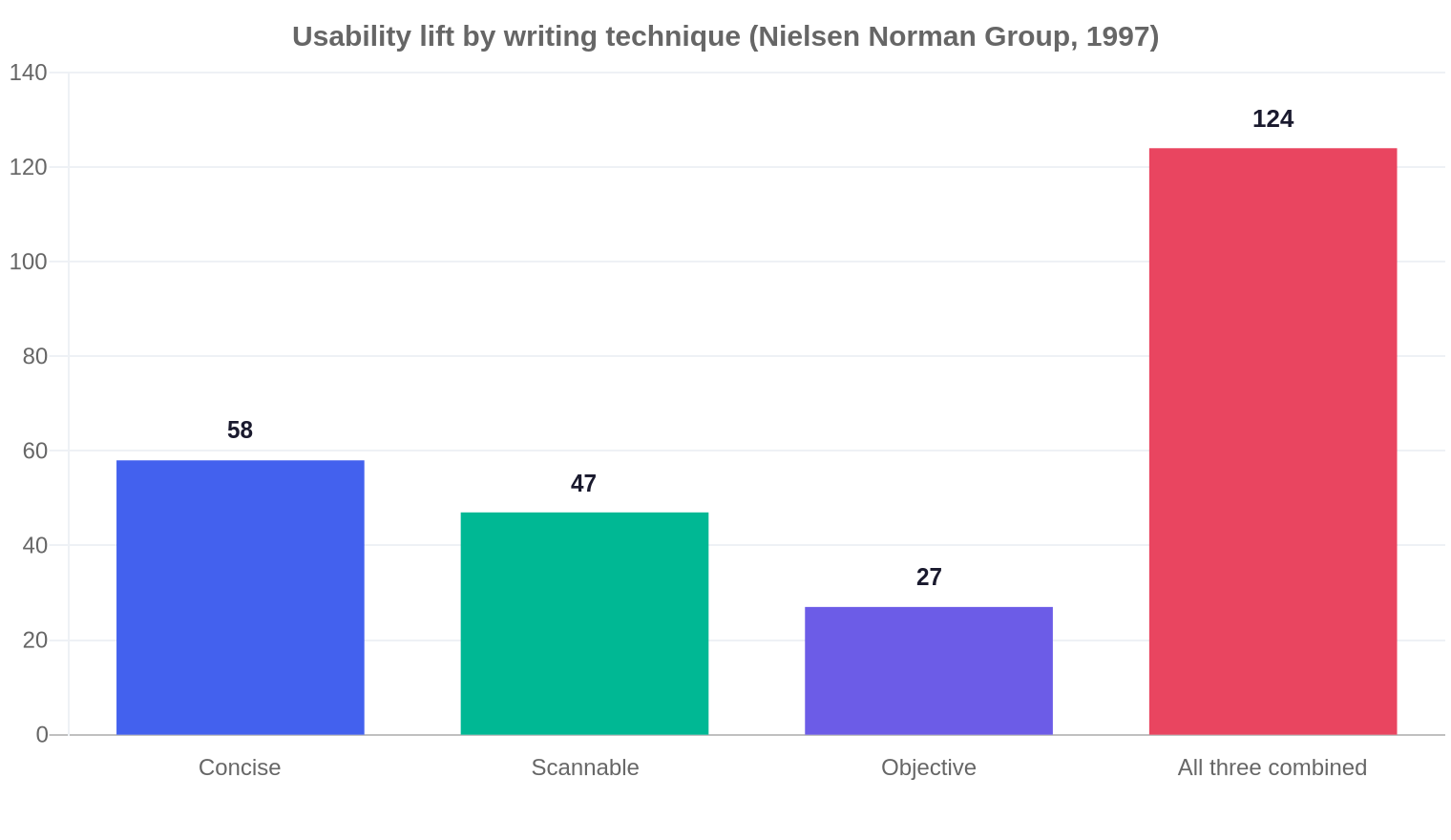
The human side is well documented. Research compiled by VisibleThread shows 83% of web users scan text before committing to read it, and the average US reading level sits around 7th grade even among specialist buyers. Jakob Nielsen’s formula quantifies the payoff: concise writing lifts usability by 58%, scannable structure by 47%, and objective style by 27%, for a 124% combined lift over promotional copy. That study was run on Sun Microsystems’ website in 1997, and it is still the most cited benchmark in web writing. Nielsen’s team found users read about 28% of the words on a page, a figure that has not moved in the decades since.
Plain English is not a dumbing-down move for B2B. According to language researcher Christopher Trudeau, whose work VisibleThread has applied across enterprise content programs, “the more specialist a person’s knowledge and the more educated they are, the more they prefer plain English.” That is the opposite of the marketese most B2B sites default to, and it is the first thing an audit catches.
The AI side is where most teams are still blind. Contentstack’s AEO guidance notes that AI answer engines evaluate content at the chunk level, and SEOClarity’s research on AI search recommends high-density, self-contained sections with question-style headings and structured comparison tables. Those structures are exactly what a skimming buyer also wants, which is why the audit treats both audiences as one checkpoint rather than two.
One number should reframe your priorities: Gravitate Design’s AI readability analysis and VisibilityStack’s AI readability score both report that referral traffic from AI engines converts at roughly 3x the rate of traditional search traffic. A page that fails the AI readability check does not just lose citations. It loses the highest-converting traffic available to a B2B site, which is the failure mode covered in why AI content misses revenue.
The 5-Gate Scannability Framework
The 5-Gate Scannability Framework audits every B2B page against five gates in order: readability, sentence length, heading structure, visual markers, and machine extractability. Each gate has a pass/fail benchmark, so the audit produces a score, not an opinion.
How to run a scannability audit in 5 steps
Run the audit on the pages that matter most, not your whole catalog. Start with your top 20 traffic pages and your bottom-of-funnel conversion pages, then score each one against the five gates.
Step 1: Score readability with a tool
Paste the rendered text (tags removed) into a readability checker. VisibleThread and WebFX both offer free calculators for Flesch Reading Ease and grade level. On a mid-market compliance software client’s flagship guide, the first pass scored 51 on Flesch with 23% of sentences over 25 words. Rewriting the intro and cutting connective phrases moved it to 63, which pushed it past the Gate 1 bar of 60.
Step 2: Measure sentence and paragraph length
Flag every sentence over 20 words and every paragraph over 3 sentences (2-3 lines on desktop, less on mobile). In the same compliance example, the original guide had 14 paragraphs of 5-7 lines. Splitting them to 2-3 lines each raised time-on-page by roughly 40 seconds per session over the following month, per the client’s analytics.
Step 3: Run the Elevator Test on headings
Copy every H2 and H3 into a blank document and read them in order. If the argument does not survive without the body text, rewrite the headings. Question-style headings are the single highest-impact change for AI citation, because models map a user’s query directly to a matching heading.
Step 4: Audit bold text and visual breaks
Extract every bolded phrase and read them as a skeleton. VisibleThread’s research recommends bolding only the phrase a skimmer needs, never a generic label. Then check for at least one structured comparison table in any post that compares options, because tables let AI extract specifications without hallucination.
Step 5: Verify machine extractability
Open the rendered page and look for three things: self-contained paragraphs (no paragraph that starts with “This” or “They” and depends on an earlier one), FAQPage or Article schema in the source, and content that renders without JavaScript. AI crawlers cannot execute client-side JS, so a React or Angular page without server-side rendering is invisible to Perplexity regardless of its words.
A worked example keeps the method concrete. A fictional B2B SaaS vendor, call it Meridian CRM, ran this audit on its pricing comparison page. It scored: Gate 1 pass (Flesch 66), Gate 2 fail (average 27 words per sentence), Gate 3 pass (clear H2s), Gate 4 fail (no comparison table, only paragraphs), Gate 5 pass (schema present). The fix list was three items: split the 27-word average to under 20, add a 3-row comparison table, and add two bolded anchors near the top. Total edit time was about 40 minutes for one editor.
Where to spend your next 10 hours
Use this decision matrix to route your audit budget toward the fixes with the highest compound return. Scores rate impact on a 1-5 scale: citation impact for AI traffic, read-through impact for human engagement, and effort in hours.
Scannability benchmarks your QA checklist needs
Scannability becomes enforceable only when you can score it. The qualitative advice in most guides, “make it easier to skim”, gives an editor nothing to check. These five quantitative benchmarks turn the audit into a pass/fail gate any freelancer or junior editor can apply without a senior opinion.
These numbers do double duty. A heading density target of one heading per 250 words keeps sections digestible for humans, and it also gives LLMs more anchor points to map against conversational queries. The sentence ceiling protects comprehension that drops from near 100% at 8 words to about 4.5% at 29 words. The bold budget keeps the skimming skeleton readable, because bolding everything is the same as bolding nothing.
Add the five checks to your brief template as a scored gate: each benchmark either passes or fails, and a draft that fails three or more goes back to the writer before it reaches the senior editor. That single change removes the most common failure mode in content operations, which is a draft that reads fine on the writer’s screen and vanishes in the rendered layout.
How to prioritize a legacy catalog without boiling the ocean
If you have hundreds of published posts, the point is not to fix them all. The point is to fix the ones with the highest revenue exposure first, using a score that combines traffic, intent, and current failure level.
The standard guidance stops at “audit your content.” The prioritization question, which page first, is where most teams stall. A simple three-factor score works in practice: traffic rank (how many visits this page already earns), intent weight (a bottom-of-funnel pricing page outranks a top-of-funnel news post), and gate score (how many of the five gates the page currently fails). Multiply and sort. In a 300-post portfolio, this reliably surfaces the same handful of pages every quarter, which is where the audit budget should go.
An example makes the tradeoff visible. A publisher with a 400-post library scored a product comparison page at traffic rank 8, intent weight 5, and 4 failed gates, for a priority score of 160. A blog update from the same library scored 5, 2, and 2, for a score of 20. The comparison page got the rewrite slot, and the update waited. Running the same math every quarter prevents the slow drift toward fixing whatever post is easiest to reach.
What most teams get wrong
Most teams treat scannability as a style preference, then discover too late that it is a measurable system with a prioritization problem. Five common missteps cost B2B teams months of effort.
They audit the whole catalog instead of the top of the funnel. A legacy catalog of 300+ posts has no business being rewritten all at once. The sources on scannability tell you what good structure looks like, but almost none tell you which pages to fix first. The answer is a score of traffic times conversion intent times current failure level: fix the pages with the most to lose first, and leave the 200-word news posts for later.
They ignore the CSS handshake. Writers spend hours splitting paragraphs, then the CMS renders them at 11px with 1.1 line-height in a 1200px container. Scannability is defined by the stylesheet as much as by the words. Check line-height (1.5-1.6 is the target), container width (650px or less for reading comfort), and font size (16px minimum) before you blame the writer.
They treat the answer-first rule as a narrative killer. AEO guides demand a direct answer in the first 40-60 words of a section, while copywriting guides demand a hook. These conflict only if you assume a section has room for one opening. In practice the structure is answer first, then hook: lead with the declarative statement an AI can extract, then follow with the story, example, or context that earns the human’s attention. Meridian CRM’s pricing page now opens with the answer sentence and follows with the comparison story, and its AI referral sessions grew in the quarter after the change.
They count paragraphs, not lines. The mobile paragraph wall is a screen-size problem, not a word-count problem. A 4-line desktop paragraph becomes a 10-line wall on a phone, where over 60% of web traffic lives. Audit at 375px width, not just desktop.
They leave citations to chance. Teams write for humans, publish, and hope AI models figure it out. The data says otherwise: comparison tables and FAQ schema are the two structures most consistently tied to citations. If a page answers a comparison or a question and has neither, that is the first fix to make.
What to do next
Run the 5-gate audit on your top 20 pages this week, then publish the fixes in batches rather than waiting for a perfect rewrite. Start with the pages that have a clear query intent: comparison pages get tables, question pages get question headings and FAQ schema, and every high-traffic page gets a readability pass to Flesch 60.
Set a recurring audit on a quarterly cycle, because structure degrades as teams add sections. A page that passes today fails Gate 3 the moment someone appends three H3s that repeat the H2. Add the audit to your editorial process at the draft stage, so content ships scannable instead of being rescued after the fact.
Track the outcome in the metrics you already watch: AI referral sessions, time on page, and conversions from the fixed pages. If you want the full measurement playbook, read our guide to measuring AI search visibility, and pair the structure audit with a broader SEO audit for the checks scannability does not cover.
Frequently asked questions
What is the difference between readability and scannability?
Readability measures how easy text is to understand, using scores like Flesch Reading Ease and grade level. Scannability measures how easy a page is to survey, using headings, paragraphs, lists, tables, and bold text. Readability is about the words; scannability is about the structure around them.
What is a good readability score for B2B content?
Aim for Flesch Reading Ease of 60 or higher and a grade level near 7-8. Research consistently shows that expert and executive buyers prefer plain English even on technical topics, so complex vocabulary is rarely the right tradeoff.
How does AI search use content structure?
AI engines retrieve content at the paragraph or chunk level, then combine chunks into an answer. Self-contained paragraphs with clear nouns, question-style headings, and structured schema give a model what it needs to cite your page instead of a competitor’s.
How often should I run a scannability audit?
Run a full audit quarterly on your top 20 pages, and add a lightweight version to the editorial process for every new draft. Structure degrades quickly when editors append sections, so the audit that happens before publish is the one that saves the most rework.
Do tables really improve AI citations?
Yes. Multiple AEO and AI readability sources report that structured comparison tables act as citation magnets, because models can extract specifications and pricing from a table without hallucination. If your page compares options, a real HTML table is the single highest-value structure you can add.
Do I need schema for AI search to cite my page?
Schema is not strictly required for citations, but Article, FAQPage, and Product markup significantly improve the odds. Schema gives crawlers a labeled map of your content’s relationships, which is why the strongest B2B pages pair clean structure with clean markup.
