

Quick Answer: How do you find outdated blog posts using Google Search Console?
In Google Search Console, go to Performance > Pages, set the date range to the last 12 months, and sort by impressions. Filter for pages with over 100 impressions but under 1% CTR — these posts are indexed and have search demand but weak titles or content. Also look for posts that previously ranked well (check year-over-year comparison) but have dropped, which often indicates the content has become outdated.
Disclosure: Some links in this post are affiliate links. If you sign up through them, I may earn a commission at no extra cost to you. I only recommend tools I believe are genuinely useful.
Google Search Console already has the answer to which of your blog posts are outdated. You do not need a paid tool, a crawl, or a manual content review to start. You need the performance report, the right date comparison, and about twenty minutes.
The signal is consistent across almost every B2B blog: a page that used to rank well and is now sliding down the results page, losing impressions, or getting fewer clicks despite similar visibility. GSC shows you all three of those signals directly, and once you know which filters to apply, finding your highest-priority outdated content becomes a repeatable five-step process rather than a guessing game.
Table of Contents
Why Search Console Is the Right Starting Point

Most content audit advice starts with a crawl tool or a spreadsheet of every URL on your site. That is the wrong starting point if your goal is finding outdated content specifically. A crawl tells you what exists. It says nothing about what used to perform well and no longer does, which is the actual signal that separates outdated content from content that was simply never going to rank.
Search Console is the only free tool that gives you historical ranking and click data tied directly to Google’s own index. When a page that ranked third for its primary keyword a year ago is now ranking fourteenth, that is not a guess about content quality. That is Google telling you, through its own data, that something about the page no longer satisfies the query as well as it used to.
The other reason to start here rather than with a crawl is prioritisation. A site with 200 blog posts might have 40 that are technically thin or under-linked. Far fewer of those 40 are actually losing organic traffic. Search Console lets you filter directly to the pages that are costing you traffic right now, which is a much smaller and more actionable list than every page that could theoretically be improved.
The Three Decay Signals to Look For
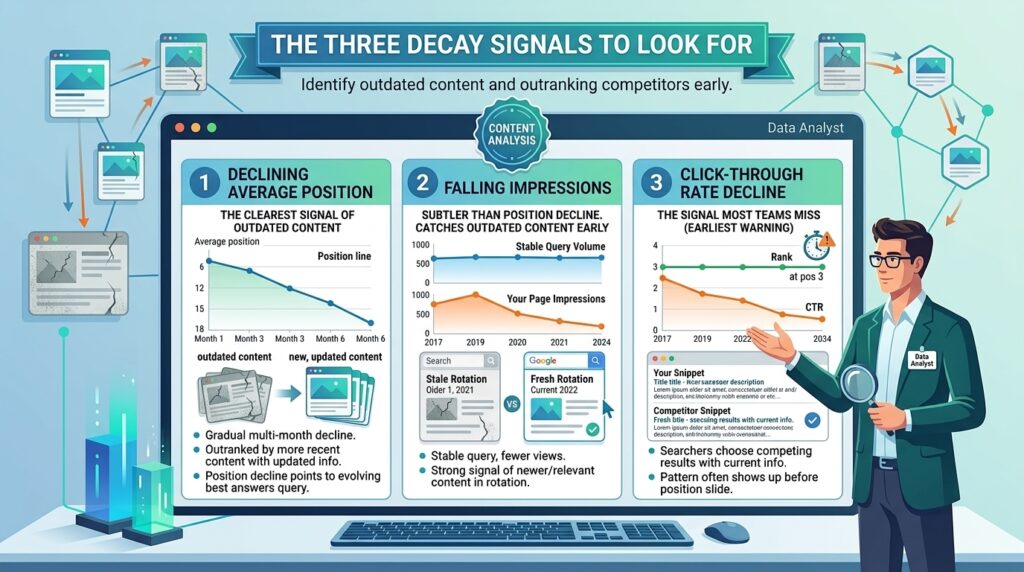
Declining average position
This is the clearest signal of outdated content. A page that has dropped from an average position of 6 to an average position of 18 over six months is being outranked by something, usually more recent content covering the same query with updated information, statistics, or examples. Position decline that happens gradually over months, rather than suddenly, almost always points to content that is ageing relative to a query whose best answer keeps evolving.
Falling impressions on stable queries
Impressions tell you how often your page appeared in search results for a given query, regardless of whether anyone clicked. A drop in impressions on a query that has not changed in search volume usually means Google has started showing your page less often for that query, which is a strong signal that newer or more relevant content has taken its place in the rotation. This is a subtler signal than position decline and often catches outdated content before the position drop becomes severe enough to be obvious.
Click-through rate decline at stable position
This is the signal most teams miss entirely. A page can hold its ranking position while its click-through rate quietly drops, which usually means searchers are seeing your result, seeing competing results with more current titles or descriptions, and choosing those instead. This pattern often shows up before the ranking position itself starts to slide, which makes it one of the earliest warning signs available if you know to look for it.
Step-by-Step: Finding Outdated Posts in Search Console
Open Performance and set a comparison date range
In Google Search Console, open the Performance report and click the date filter. Select Compare, then choose to compare the last six months against the previous six months. This comparison window is long enough to filter out short-term seasonal noise while still being recent enough to catch content decay before it becomes severe. For blogs with strong seasonal patterns, comparing year over year instead of six months over six months gives you a cleaner read.
Filter to Pages and sort by clicks descending
Switch the report view from Queries to Pages. Sort by clicks in the current period, descending. This surfaces your highest-traffic pages first, which matters because a page losing 50 percent of its traffic from a high baseline represents far more lost opportunity than a page losing 50 percent from a baseline that was negligible to begin with. Prioritising by absolute traffic loss rather than percentage loss focuses your attention on the pages where a content update will have the largest measurable impact.
Add the comparison columns and look for the pattern
With the comparison period active, GSC shows you the percentage change in clicks, impressions, CTR, and position for each page between the two periods. Scan for pages where clicks and position have both declined, ideally by 20 percent or more on clicks and a meaningful drop in position. A page showing decline across both metrics simultaneously is a much stronger outdated content candidate than a page where only one metric has moved, since a single-metric change can sometimes be explained by factors unrelated to content quality.
Cross-check against publish or last-updated date
Pull up your CMS or your content calendar and check the publish or last-updated date for each page on your shortlist. A page declining in performance that was last meaningfully updated more than 18 months ago is a near-certain outdated content case. A page declining in performance that was updated three months ago points to a different problem, possibly a competitor publishing something stronger, an algorithm update affecting the query category, or a technical issue rather than content staleness.
Build your priority list and assign an action
Take your shortlist of pages showing decline across multiple metrics and rank them by absolute click loss. For each page, make a quick call: update the content with current information and examples, consolidate it into a stronger related page if the topic overlap is significant, or, in rare cases, redirect it if the topic no longer has business relevance. This becomes your action backlog for the next content refresh cycle.
How to Read the Comparison Data Correctly
Not every decline in GSC means a page is outdated, and treating every drop as a content problem leads to wasted update effort on pages where the real issue is something else entirely. A few patterns are worth distinguishing before you commit a page to your refresh backlog.
Seasonal queries versus genuine decay
If a page covers a topic with natural seasonality, a year-end planning guide, a budget season post, a conference recap, a six-month comparison window can show a decline that has nothing to do with content quality and everything to do with the calendar. Always check whether the same decline pattern repeated in the prior year before assuming the content itself has gone stale.
SERP feature changes versus content problems
Sometimes a decline in clicks happens because Google added a featured snippet, a People Also Ask box, or an AI Overview above your result, not because your content got worse. Search the primary query manually and check what now appears above your listing. If a new SERP feature is absorbing clicks that used to go to your page, the fix may be optimising for that feature rather than rewriting the underlying content.
Algorithm updates versus individual page decay
If you see a decline across many pages at the same time, rather than isolated to a handful of specific posts, that pattern points to a broader algorithm update rather than content-specific decay. Check the timing against Google’s search status dashboard to confirm whether a confirmed update coincides with your traffic drop. Site-wide declines need a different response than individual page refreshes, often involving a broader look at overall content quality and E-E-A-T signals rather than updating specific posts.
What to Do Once You Have Your List
Having a list of declining pages is only useful if it turns into action. The teams that get the most value from this process treat the GSC export as the input to a focused update sprint, not as a permanent reference document that sits untouched.
Start with the top five pages by absolute click loss. For each one, pull up the current top three ranking competitors for its primary keyword and compare directly. Look specifically for what they cover that your page does not: more current statistics, a section addressing a development that happened after your post was published, a clearer structure, or additional depth on a subtopic that has become more important since you wrote the original piece.
Use that competitive gap to write your update brief, then work through the B2BContentOS Content Refresh Checklist to make sure the update addresses both the content gap and the technical refresh items, like the published date, internal links to newer related content, and any outdated screenshots or product references.
After publishing the update, mark the date in your tracking sheet and check back in Search Console after 30 to 60 days. Position and click recovery after a meaningful content update typically becomes visible within that window, though competitive or high-difficulty keywords can take longer.
Common Mistakes When Reading GSC Decay Data
Reacting to single-week fluctuations
Search Console data is noisy at short time horizons. A page that shows a drop over a two-week window is not necessarily outdated. Stick to comparisons of three months or longer to filter out noise that has nothing to do with content quality.
Ignoring low-impression pages with high business value
Sorting purely by click volume can cause you to overlook a page that gets modest traffic but converts at a high rate or supports a strategically important keyword. Before finalising your priority list, cross-check it against your highest-value conversion pages and make sure none of them are missing from the list simply because their absolute traffic numbers are lower than your top blog posts.
Treating every decline as a content problem
As covered above, seasonal effects, SERP feature changes, and algorithm updates can all produce a decline pattern in GSC that looks identical to content decay on the surface. Spend the extra five minutes checking the SERP manually and reviewing the timing against known algorithm updates before committing a page to a full content rewrite.
Not setting a recheck cadence
A one-time GSC review finds your current backlog of outdated content, but decay is an ongoing process. Without a recurring check, usually quarterly for your top 50 pages, new pages will quietly join the outdated list every few months without anyone noticing until the overall site traffic trend becomes visible.
FAQ
How often should I check Search Console for outdated content?
A quarterly check of your top 50 pages by traffic is sufficient for most B2B blogs. Pages outside your top 50 are lower priority and can be reviewed during your annual full-archive audit instead. Quarterly checks catch decay early enough to update content before the traffic loss compounds significantly.
What counts as a significant decline in Search Console?
A drop of 20 percent or more in clicks combined with a position decline of three or more spots, sustained over a comparison period of three months or longer, is a strong signal worth investigating. Smaller fluctuations are common and often resolve on their own without intervention.
Can I use Search Console alone, or do I need another tool?
Search Console alone is sufficient for identifying which pages are declining. It does not tell you why, beyond the metrics themselves, or what specifically a competing page is doing better. For that competitive context, a manual search of the ranking query combined with a quick review of the top three competing results gives you what you need without requiring a paid tool. If you want automated decay alerts rather than manual quarterly checks, Semrush Content Audit adds that layer on top of the same underlying GSC data.
Why does a page show declining clicks but stable position?
This usually means the click-through rate has dropped while the ranking position has held steady, often because a competing result now has a more compelling title or meta description, or because a new SERP feature is capturing clicks that used to go to organic results. Check what currently appears in the search results above and around your listing before assuming the content itself needs a rewrite.
Should I update or delete a page that shows severe decline?
Update if the page still has search demand and the decline is explained by content staleness rather than the topic itself losing relevance. Delete or redirect only if the underlying topic no longer has business relevance or search demand has genuinely disappeared. Most declining pages are update candidates rather than deletion candidates, since the existing rankings and backlinks represent real equity worth preserving.
What to Do Next
Open Search Console today and run the six-month comparison described in this guide. Sort by clicks descending, filter for pages showing decline across both clicks and position, and pull your top ten by absolute click loss. That list is your next content refresh sprint, and you can build it in under thirty minutes with a tool you already have access to.
Do not try to fix all ten pages this week. Pick the top three by traffic loss, research what current competitors are doing better, and ship updates to those three first. Recheck their performance in Search Console after 30 to 60 days before moving on to the next batch.
For the full update process once you have identified your priority pages, the B2B Content Audit Guide walks through the complete workflow. The Content Refresh Checklist gives you the specific items to check on every page you update. And if you want to understand the broader business case for prioritising refreshes over new content, the Content Refresh ROI page breaks down the data on why updating existing pages often outperforms publishing new ones.
