
Namecheap is a solid pick for B2B teams that need cheap, reliable domain registration and are willing to trade some hosting performance for a lower bill. It is not built for teams that need enterprise SLAs, multi-user account controls, or high-traffic application hosting. Where it genuinely earns its reputation is domains and business email. Where it falls short is anything that requires scaling past a handful of simple sites.
Most reviews of Namecheap are written for solo bloggers or first-time site owners. A B2B buyer is usually managing several domains at once, a shared business email setup across a small team, and at least one site that needs to stay fast during a demand-gen campaign. That’s a different set of requirements, and almost none of the existing coverage scores Namecheap against them directly, including reviews like WebsitePlanet’s detailed Namecheap breakdown and DevProblems’ hands-on test, both of which are thorough but written for a solo or SMB buyer, not a team managing a domain portfolio.

What Namecheap Actually Offers
Namecheap sells three things a B2B team is likely to touch: domain registration, web hosting (shared, VPS, and managed WordPress through EasyWP), and Private Email, its business email product.
Domain registration is where Namecheap consistently wins. Pricing is competitive at both purchase and renewal, WHOIS privacy protection is included free on every domain, and the DNS management interface is fast enough that a marketing team can update records without waiting on IT. If your team is managing five, ten, or twenty domains across product lines or campaign microsites, this is the strongest part of the offering.
Hosting is where the story gets mixed. Shared hosting and EasyWP are fine for a simple marketing site or a landing page, but performance drops noticeably under real traffic, and the renewal pricing jump after the first term changes the math. If your site needs to handle a traffic spike during a launch or a paid campaign, this is not the tier to build on.
Private Email is the underrated part of the stack. It includes spam filtering, DKIM and SPF authentication out of the box, and a straightforward setup process. For a small B2B team that just needs reliable business email tied to its domain without paying Google Workspace or Microsoft 365 prices, it’s a genuinely good option.
The B2B Domain Stack Fit Score
Call it the Domain Stack Fit Score. It’s a way to evaluate any domain-and-hosting provider against what a B2B team actually needs, instead of the solo-blogger checklist most reviews use.
Score each of the three inputs from 1 to 5, then add them for a total out of 15.
Domain Portfolio Management. Can the platform handle multiple domains cleanly, with bulk DNS editing, easy transfers, and clear renewal visibility across the whole portfolio? Namecheap scores a 5 here. The interface is built for managing many domains at once, and bulk actions actually work.
Business Email Reliability. Does the email product handle deliverability, spam filtering, and basic security (DKIM, SPF, DMARC support) without extra configuration work? Namecheap scores a 4. Private Email is reliable and reasonably priced, though it lacks the calendar and collaboration depth of Google Workspace.
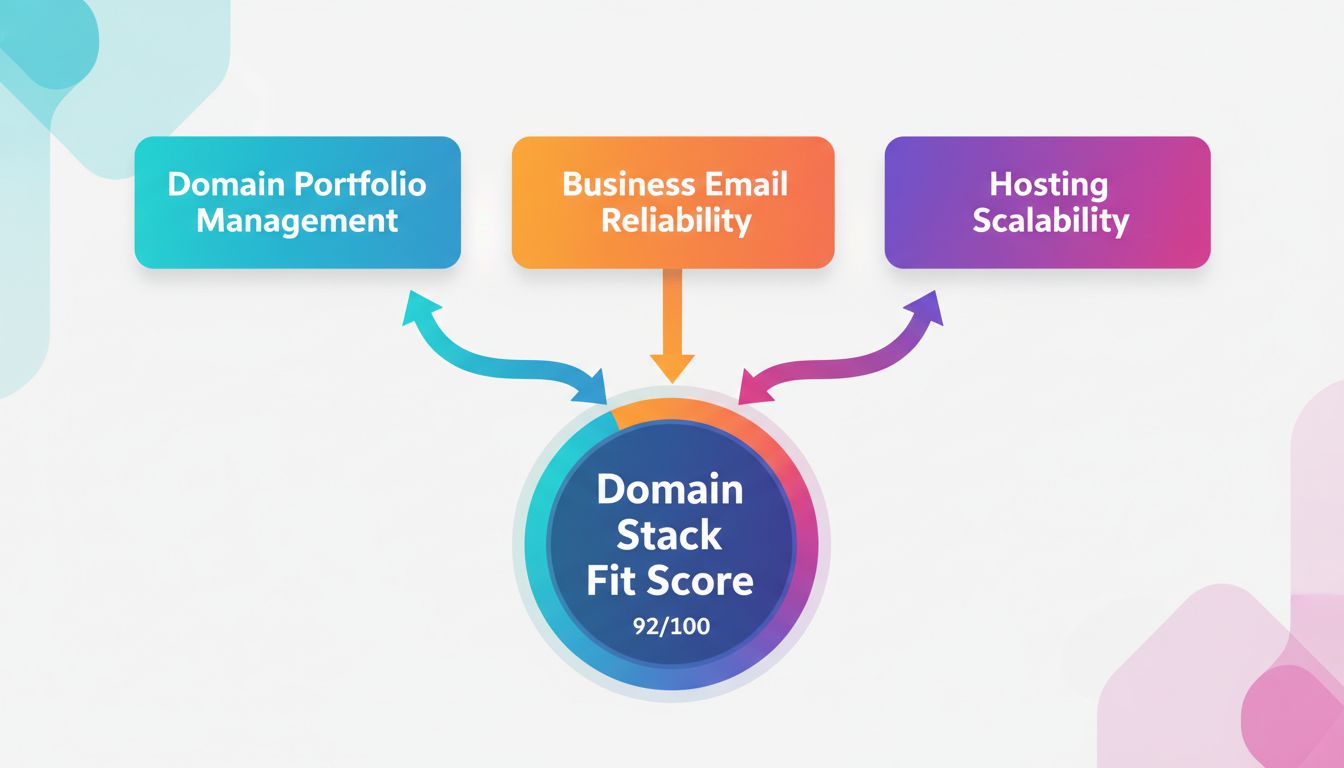
Hosting Scalability. Can the hosting tier absorb a traffic spike or grow with the business without a full platform migration? Namecheap scores a 2. Shared hosting and EasyWP are adequate for low-traffic sites, but there’s a hard ceiling before you need to move to a different provider entirely.
Total: 11 out of 15. That’s a strong score for a team that mostly needs domains and email, and a mediocre one for a team whose website is central to revenue generation.
Namecheap vs. Google Workspace vs. Hostinger for a B2B Stack
| Need | Namecheap | Google Workspace | Hostinger |
|---|---|---|---|
| Domain portfolio management | Strong, built for bulk management | Not a domain registrar | Basic, not built for large portfolios |
| Business email | Good, budget-friendly | Best-in-class collaboration tools | Basic email, weaker deliverability tools |
| Hosting scalability | Weak past small sites | N/A, not a hosting provider | Better performance tiers available |
| Best fit | Teams managing many domains + basic email | Teams that prioritize email/collaboration over cost | Teams that need better hosting headroom |
If your B2B team’s main need is managing a growing domain portfolio with dependable business email, Namecheap is hard to beat on price. If collaboration tools like shared calendars and real-time docs matter more than cost, Google Workspace is worth the premium. If your site’s hosting performance is the priority, see our full breakdown in Is Hostinger Worth It?
Step-by-Step: Setting Up Namecheap for a Small B2B Team
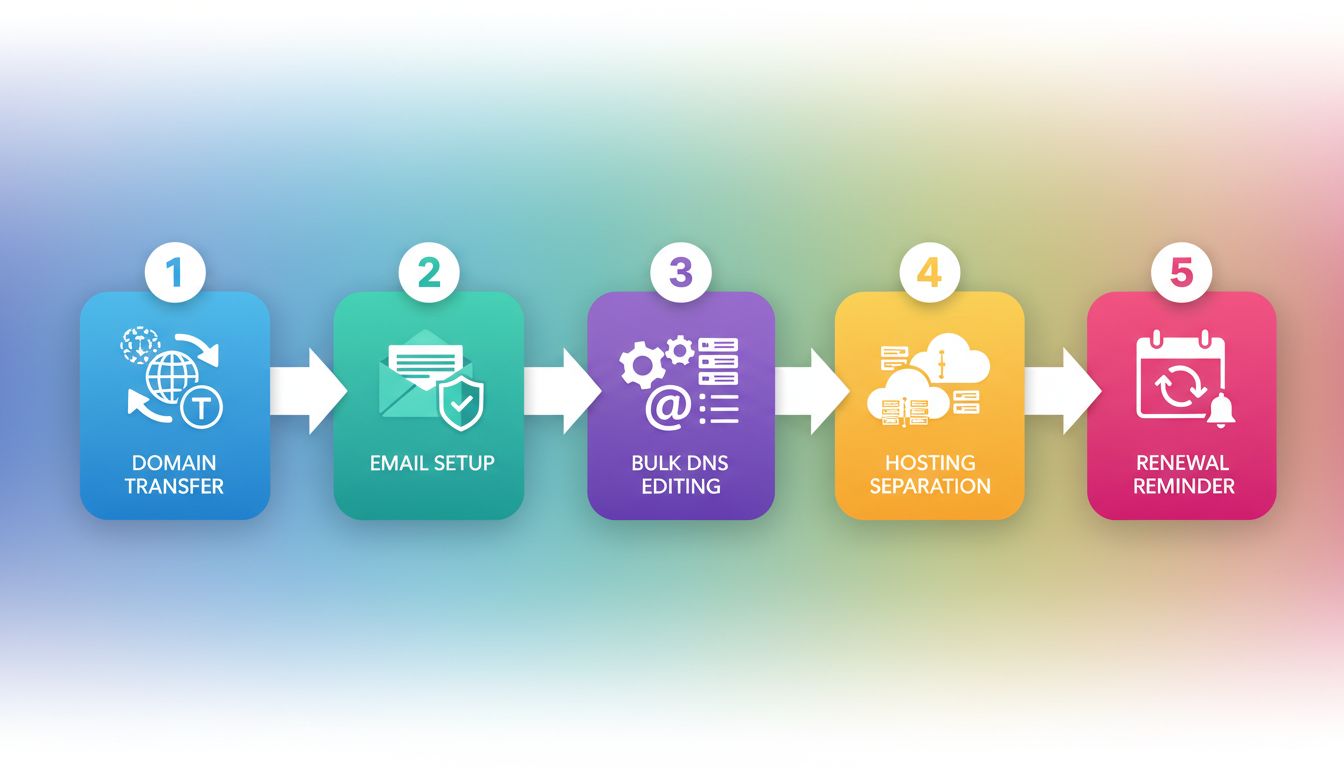
1. Consolidate existing domains under one account. If your domains are scattered across registrars from past campaigns or acquisitions, transfer them into a single Namecheap account first. This is what makes the bulk DNS management and renewal visibility actually useful.
2. Set up Private Email on your primary domain before anything else. Business email is the thing your team touches daily. Get authentication (DKIM, SPF) configured correctly from day one rather than retrofitting it later.
3. Use the bulk DNS editor for any multi-domain changes. If you’re pointing several campaign or product domains at the same infrastructure, don’t edit each one manually. The bulk editor saves real time once you’re past three or four domains.
4. Decide on hosting separately from domains. Don’t default to Namecheap’s own hosting just because it’s convenient. If your site needs headroom for traffic spikes, host with a provider built for that and keep Namecheap purely for domains and email. Our B2B web hosting comparison walks through which providers actually hold up under real traffic.
5. Set calendar reminders for renewal dates, not just auto-renew. Namecheap’s promotional pricing is attractive at signup, but renewal rates jump. Auto-renew protects you from losing the domain, not from the price increase.
What Most Teams Get Wrong

The biggest mistake is treating Namecheap as an all-in-one solution because it’s convenient to buy everything from one vendor. Domains and email are genuinely strong. Hosting is not built for the same standard. Splitting the stack, domains and email on Namecheap, hosting somewhere built for scale, gets you the best of both instead of settling for the weakest link.
The second mistake is ignoring renewal pricing at signup. The first-year price looks great. The math looks very different in year two once promotional pricing expires, especially across a portfolio of ten or more domains.
The third mistake is skipping DKIM and SPF setup on Private Email. It takes fifteen minutes and dramatically improves deliverability for outbound sales and marketing emails. Teams that skip it end up in spam folders and blame the email product instead of the missing configuration.
FAQs
Is Namecheap good for B2B businesses?
Namecheap is a strong choice for B2B teams that need reliable domain management and budget-friendly business email. It’s a weaker choice if your website itself needs to handle significant traffic, since the hosting tier has a lower performance ceiling than dedicated hosting providers.
Can Namecheap handle multiple domains for a growing company?
Yes. Namecheap’s account and DNS management interface is built to handle bulk actions across many domains, which makes it a good fit for companies managing product lines, campaign microsites, or client domains under one account.
Is Namecheap Private Email reliable for business use?
Yes, with the caveat that you configure DKIM and SPF authentication during setup. Once configured, deliverability and spam filtering are reliable enough for day-to-day B2B email, though it lacks the collaboration features of Google Workspace or Microsoft 365.
Should I use Namecheap for hosting my B2B website?
Only if your site is small and low-traffic. For anything customer-facing that needs to handle campaign spikes or growing traffic, a dedicated hosting provider will perform better. Keep Namecheap for domains and email, and host elsewhere if performance matters.
How does Namecheap compare to GoDaddy for a B2B team?
Namecheap is generally cheaper at both purchase and renewal, and includes free WHOIS privacy protection that GoDaddy charges separately for. For a cost-conscious B2B team managing several domains, Namecheap is usually the better value.
What To Do Next
If your team is managing more than a handful of domains with scattered renewal dates and no business email standard, move domain registration and email onto Namecheap this month and score your current setup against the Domain Stack Fit Score above. Keep hosting decisions separate: use our B2B web hosting comparison or Liquid Web vs. HostGator breakdown to pick infrastructure that can handle real traffic. Set up DKIM and SPF on day one of any new email configuration. Avoid the trap of buying everything from one vendor just because it’s convenient at checkout.
Related reading: GreenGeeks Hosting Review for a sustainability-focused hosting alternative, and Best Email Marketing Tools for Solo Founders if outbound email volume is a bigger priority than inbox reliability alone.
